
GTA 6 offers no classic difficulty setting and keeps its best aids in the menus and the phone. To start playing GTA 6 without losing money or time, these fifteen tips come from four guides published since November 18: Kotaku (32 tips by Zack Zwiezen), GameSpot (13 tips, November 20), Push Square (12 tips by Sammy Barker) and BGR for the settings. Each tip names its source, and the text says when only one guide makes the claim. Jason and Lucia’s stats, money and the police get one sentence each here.
To start playing GTA 6, set up combat, controls and comfort first
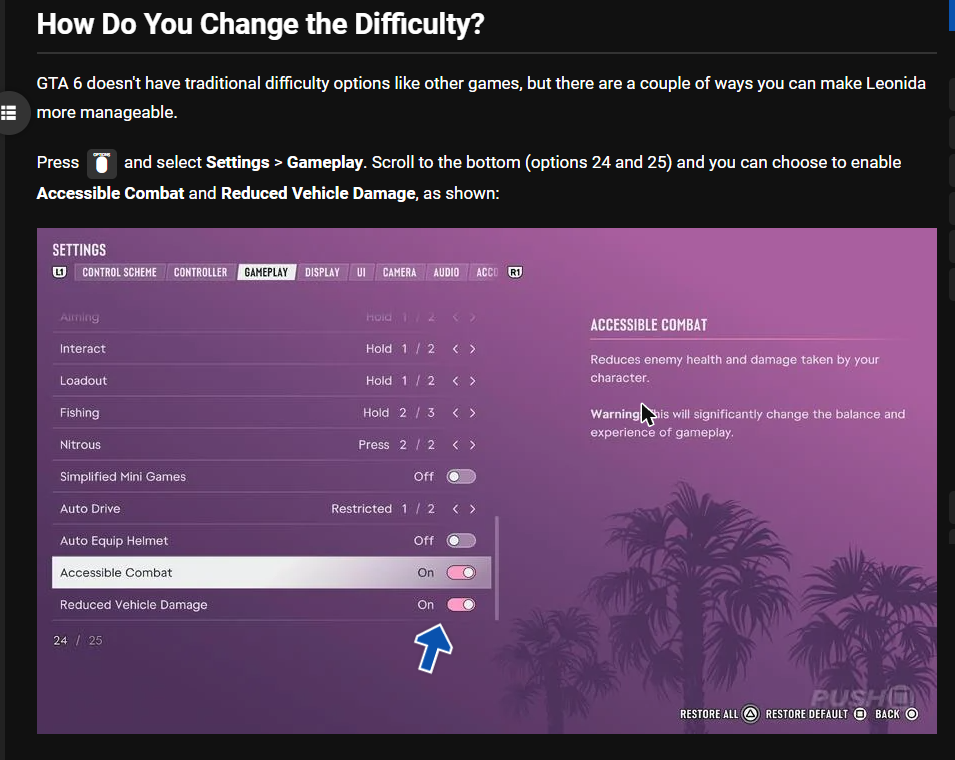
1. Turn on accessible combat if gunfights block you. According to Push Square, GTA 6 has no classic difficulty setting. In Settings, Gameplay, the last two options (24 and 25) do the job: « Accessible Combat » lowers enemy health and the damage you take, and « Reduced Vehicle Damage » spares the car. The game warns that this changes the balance of the playthrough. The story stays the same and trophies stay active, which matters if you are after the platinum: see our list of the 27 visible trophies. BGR reaches the same conclusion: no difficulty slider, only these aids.
2. Pick your control scheme. In Settings, « Control Scheme », the « Default » layout is new. Push Square says « Classic » keeps the GTA 5 and GTA Online approach, handy after ten years of habits. BGR adds a left-handed scheme.
3. Turn on the aids the game leaves off or hides. BGR goes through the menu, and these six settings are worth a look before you start playing GTA 6 for real.
| Setting | What it changes | BGR’s note |
|---|---|---|
| Voice GPS | Reads the route out loud | Off by default |
| Map icons | Enlarges icons on the map and minimap | Makes the map easier to read |
| Projectile Arc | Shows where a thrown object will land | A visual marker on projectiles |
| Aim assist | Sets from 0 to 5 how fast aim tracks targets | Scale from 0 to 5 |
| Mini-game difficulty | Eases gym sessions, for example | To get back to missions faster |
| Licensed music | Can be muted for streaming | Avoids copyright strikes |
Settings listed by BGR (Nichols deCourville, November 18, 2026). The right-hand column repeats the guide’s notes.
BGR also notes that Rockstar considers the game best looking on PS5 Pro. Our article on which console to play GTA 6 on compares the PS5 Pro and the Series S.
Before heading out: eat, read, check your phone
4. Eat and drink before every outing. Kotaku explains that food and drink improve health, stamina and Focus (the meter that slows time during a fight), and that you can eat while driving or shooting. According to GameSpot, these bonuses last until the end of the session or until the character dies.
5. Flip through magazines and flyers to the end. Only GameSpot flags this: « Certain magazines and flyers you interact with can unlock things like contact numbers in your phone and fishing spots on your map. » You need to go through them in full to get the bonus.
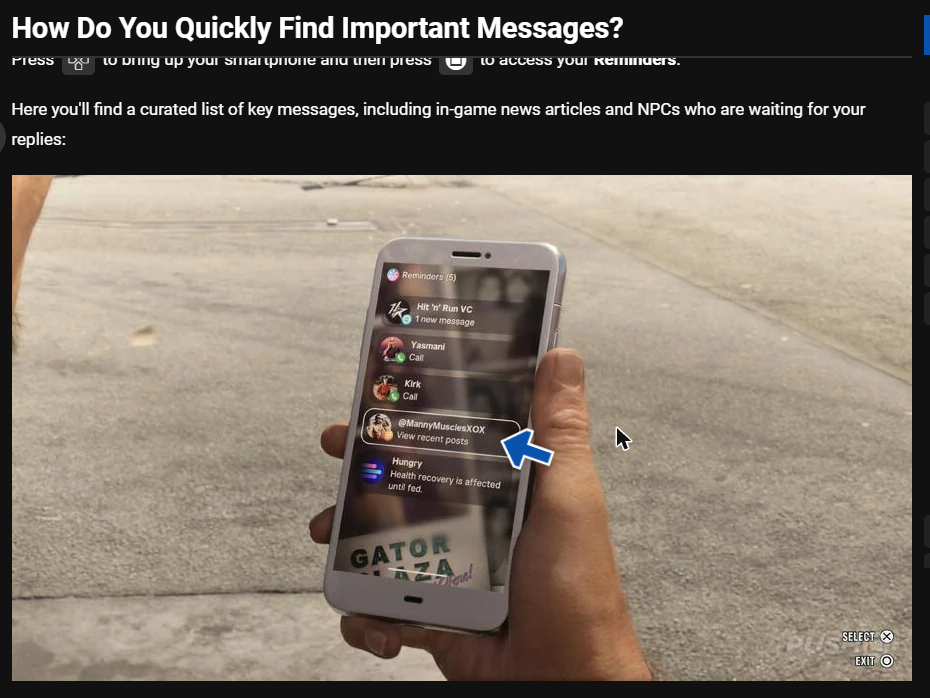
6. Open the phone reminders when you no longer know what to do. To open them, GameSpot says up on the D-pad, then Square or X. The tab lists articles, Snapmatic posts, messages and characters to call. These reminders rarely push the story, but one of the writers liked a Snapmatic post: the character called Lucia and a chain of side missions opened up. Kotaku and Push Square confirm the tab; Kotaku notes it can also reveal new scenes between Jason, Lucia and their contacts.
On the street: Focus, vibrations and cops
7. Follow shouts and sirens with Focus. Kotaku describes a world full of random events, one of the nice surprises when you want to start playing GTA 6: a drug deal going bad, or someone looking for their spouse after a night out. When you hear noise, click both sticks to turn on Focus and find the source. GameSpot adds that outside combat, Focus can be used without limit and colors what matters.
| Color | What Focus shows | Source |
|---|---|---|
| Red | Enemies, including through walls | GameSpot |
| Yellow | Objects you can interact with | GameSpot |
| Green | Cash | GameSpot |
| Red (doors) | Doors wired to the alarm: better to go around them or lockpick them | Kotaku |
Focus colors as listed by GameSpot (November 20, 2026) and Kotaku (November 18, 2026).
8. Stop when the controller vibrates on foot. According to Kotaku alone, a sudden, intense vibration means there is probably a piece of art or something else to scan nearby. Pull out the WAiNK app on the phone and look around.
9. Defuse a one-star cop. With no weapon out, hold the left trigger on the cop: the game offers to defuse or provoke. According to Kotaku, a one-star wanted level is erased this way, and the option works on any bystander, although some will attack anyway. On the police side, GameSpot says they no longer know where you are by default: appearance, outfit, visible weapon, vehicle, cameras and your partner all guide them.
Cars and fast travel
10. Scan the car before stealing it. Hold up on the D-pad to open WAiNK: GameSpot says it shows the security system, the resale price and the registration cost. Avoid advanced trackers early on, Kotaku warns: a red icon near the gauges means the police can locate you if you drive too slowly, and GameSpot adds that only speed stops the signal. To lockpick faster, Push Square advises finding the pink zone in the mini-game. To keep a car, go to Pay ‘n’ Spray: the fee follows the car’s value (GameSpot: cheaper for a humbler model), and you need a free slot.
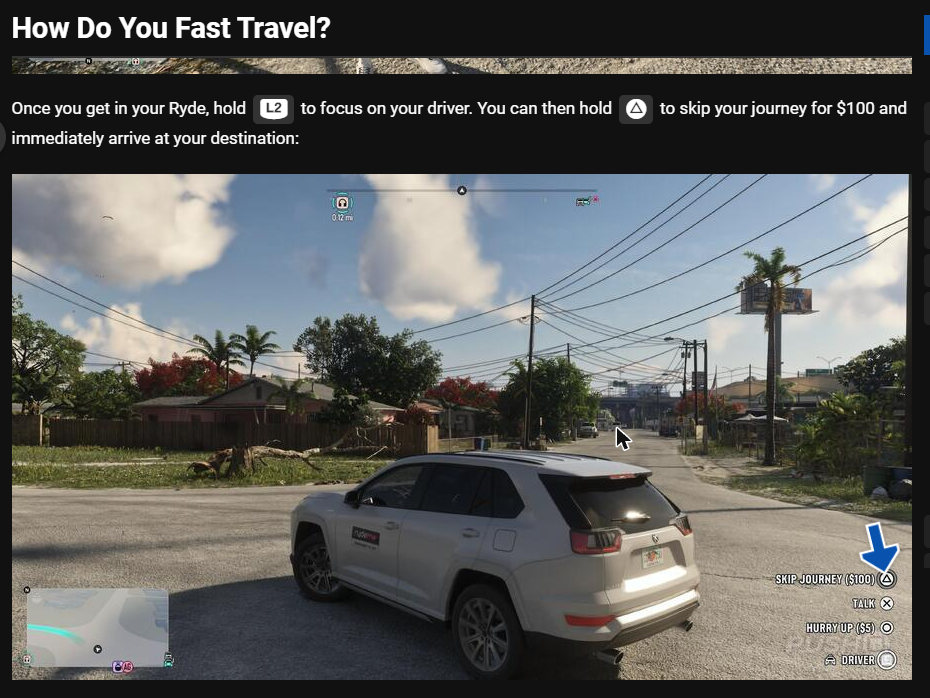
11. Travel with RydeMe, public transport or the other character. When you want to start playing GTA 6, the map looks huge. Kotaku, Push Square and GameSpot agree: there is no classic fast travel, but a RydeMe driver and, once in the car, the left trigger on the driver offers to skip the ride for $100. Cheaper options are buses and trains, which run on schedules. GameSpot notes that switching characters saves you recrossing the map, since the other one stays near the safehouse.
Money, non-lethal combat and saves
12. Deposit your cash. It is the first money reflex to start playing GTA 6 right. Push Square warns that wallet money is lost if the character is busted or killed, while money in the BuckMe bank (unlocked in Chapter 1) is protected. In the phone, BuckMe then ATM Finder sets a waypoint to the nearest ATM. GameSpot adds that dying with stash bags makes them disappear too.
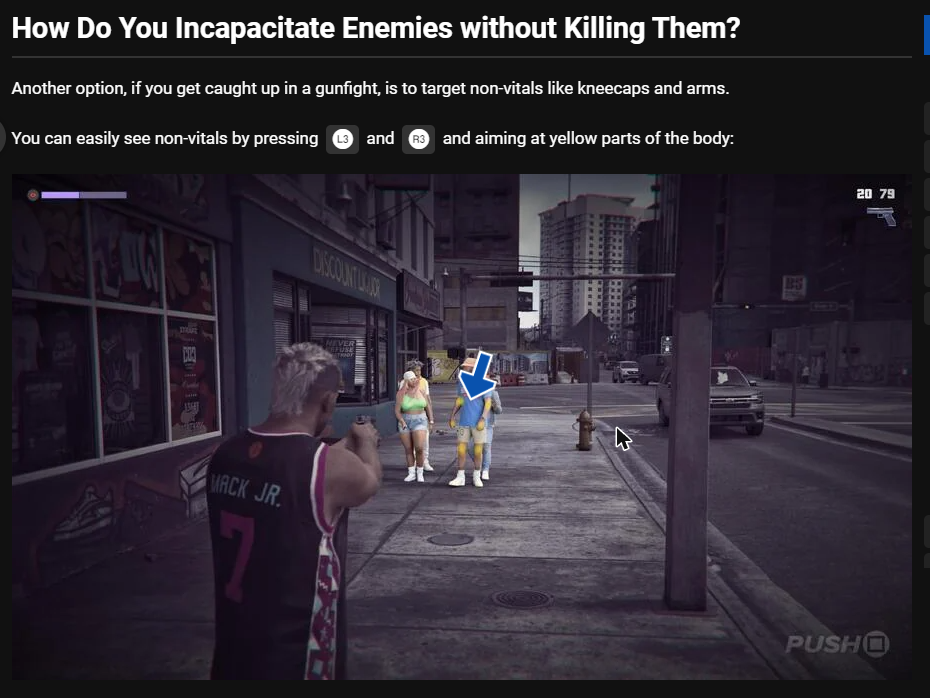
13. Play non-lethal if your criminal profile matters to you. According to GameSpot, aiming at the head or heart kills, while aiming at joints injures: a red marker means a dead enemy, a yellow marker an enemy out of the fight. Push Square shows that the reticle displays a yellow or red cross, and that a stealth grab knocks out without killing. The stake is the criminal profile: GameSpot says that if you play violently, Lucia behaves more violently when you are not controlling her.
14. Make one manual save per chapter. To start playing GTA 6 without losing progress, save by hand. GameSpot describes a story split into chapters, each centered on a different safehouse: once you have left one, you cannot return without a manual save. PC Gamer counts 15 slots. Our article on GTA 6 saves explains how to protect your game, and our sorting of viral bugs helps tell which of the clips going around are real.
Two GameSpot caveats for starting out in GTA 6, then the cheat codes
15. Wait for Chapter 3 for banks, and for duo mode for most robberies. Only GameSpot says it: most of the cash in banks and loan stores hides dye packs that explode when you move away from the building, and the jammer that neutralizes them only arrives in Chapter 3, with a certain character. The same guide recommends waiting until you can play Jason and Lucia together: a two-person robbery is much easier to manage.
Cheat codes unlock separately. PC Gamer says you must first finish the 91 story missions, then complete one challenge per code. They cut saving and achievements while active. Our article on GTA 6 cheat codes gives the list of inputs; here are the unlock conditions worth planning for while you play.
| Code | Unlock condition | Source |
|---|---|---|
| Body Armor | 100 workouts | PC Gamer |
| Parachute | 50 skydives of base jumps from over 300 ft | PC Gamer |
| Max Ammo | 20 bronze medals or better at shooting ranges | PC Gamer |
| Infinite Ammo | 25 silver medals or better at shooting ranges | PC Gamer |
| No Reload | 25 gold medals at shooting ranges | PC Gamer |
List by PC Gamer (Sean Martin, updated November 23, 2026). A regular parachute can be bought at Ammu-Nation, according to Lauren Morton’s guide: the cheat code is a separate matter.




0 Commentaires
Aucun commentaire pour le moment. Soyez le premier à commenter !