📖 Source : Forum officiel Ascension
Author Preface
Information that I am speculating about or have not personally verified, I will mark with the following:
- {?}
When it comes to sections marked, I will still strive to give the most accurate information and best advice that I am able to.
Table of Contents
Creating Your Character
New to WoW? Start Here!
- Quick-Start Pointers
- The Bottom Panel
- Inventory Management
- Your Character’s Resources
- Buffs and Debuffs
- Navigating Zones
- Catch a Ride! (Mounts)
- Flight Masters
- Leveling up Skills
- Professions
- The Soulbound Mechanic
- The Auction House
- The Bank
- Freepick Learning Skills
- Companions
The Leveling Journey
Endgame Activities
Ascension Specific Changes / Mechanics
- Classless
- Mystic Enchants
- Vanity Items
- Multi-spec
- Cross-Faction
- Transmogs / Wardrobe
- Reputation
- Manastorm
- Hero Architect
- Open World Changes
- Dungeon Finder Scaling
- Profession Exp
- Multiprofession
- Motherlodes
- Trials / Challenges
Creating Your Character
[anchor=creating-your-character]
The Factions of Azeroth
[anchor=the-factions-of-azeroth]
When creating your character, you are offered a choice to choose a faction and a race! Despite being enemies in the original World of Warcraft, in Project Ascension, you may talk to and party up with members of the opposite faction and even create cross-faction guilds. While you may quest together, be sure to part ways for a bit to return to the faction-specific towns / cities as the guards will still be hostile to members of the opposite faction!
One sentence descriptions of the 2 factions from Belghast’s video:
- The Alliance is a gathering of like-minded peoples trying to hold on the legacies of their ancestors and preserve their ways of life in a changing world
- The Horde is a motley coalition of drastically different peoples that have broken with tradition and are trying to carve out a place for themselves
Note: There are still faction-specific quests out in the world!
The Archetype System
[anchor=the-archetype-system]
The Archetype system is an Area-52 Server specific feature that lets you play as one of many pre-made Featured Builds in Ascension! These builds will automatically handle allocating skills, talents, and enchants for your character! Just follow the on-screen guide to help you get started with one. If you ever change your mind and want to try out a different Featured Build, you may swap between them so long as you’re below level 10.
Note: You may also choose the « Freepick » option instead of Archetype to forego using a pre-made build. Caution is advised as this is only recommended for experienced players.
New to WoW? Start Here!
[anchor=new-to-wow-start-here]
Quick-Start Pointers
[anchor=quick-start-pointers]
If this is your first time playing World of Warcraft then this section is just for you! Here are some quick bulletpoints to help you get started:
- By default you use WASD to move forwards, backwards, and to turn your character, with Q and E acting as strafing keys
- You can use your mouse to target friends and enemies with Left-Click or the Tab key to target only enemies in front of your character
- Holding Left-Click and moving the mouse around will let you move the camera around without turning your character. Hold Right-Click and move to also turn your character
- Right-Clicking on an enemy will have your character auto-attack that enemy when in melee range. If you know Auto Shot you also will shoot the enemy while they are at a distance
- Right-Clicking on a neutral or friendly NPC will interact with them
- By default, the number keys, 1 through 0, can be used for casting spells and abilities. Check your hotbar for which spells are associated with a specific key
- Using an attack ability will also cause your character to begin auto-attacking the enemy
Note: You may change the above keybindings by pressing the Escape key and selecting « Key Bindings ».
The Bottom Panel
[anchor=the-bottom-panel]
At the bottom center of your screen (to the right of your hotbar) is your bottom-bar panel. This contains buttons for menus that will help you keep track of your character’s equipment, spells / abilities, etc.
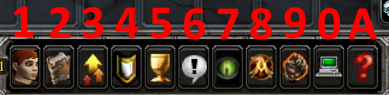
1: This opens the Character panel (C by default). This is where you can check your equipment, pets / mounts, reputation standings, skill levels, and currencies.
2: This is your spellbook (P by default). It contains all known spells / abilities. You may drag and drop from your spellbook onto your hotbar to customize it. Check back in here when leveling up to see if you learned something new!
3: This is the Character Advancement tab (N by default). This is where you can obtain skills and talents when in free-pick mode, check out the Hero Architect, check your vanity collection, mystic enchants collection, Seasonal progress, and your Wardrobe / Transmogs.
4: This is your Achievements tab (Y by default). Some achievements can give you special rewards and this is where you can find information on them.
5: This is your Quest Log (L by default). Quests you have accepted can be found here!
6: This opens the Social menu (O by default). You can find your friends, guild, and raid members here.
7: The Activities tab (I by default) becomes available at level 10. Here you can queue up for dungeons, manastorm, battlegrounds, and check your Mythic+ Keys.
8: This opens the Path to Ascension menu. Here you can find a pseudo-tutorial for progressing through the game and earn rewards while doing so!
9: This is the Trials menu. If you want to participate in a challenge (such as Hardcore), this menu is the way to start them.
0: This opens the Game Menu (Escape by default). You can change settings and keybinds from here, as well as logout and close the game.
A: This will open the Help Request menu and allow you to open a ticket to talk to a GM for help with resolving an issue you are having and get your character unstuck.
Inventory Management
[anchor=inventory-management]
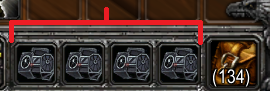
You can find your bags / inventory in the bottom-right corner of your screen. As you kill mobs, complete quests, and gather materials, you can find your new goods here! Here are some quick notes about your inventory:
- You can open your main backpack with B or open all your bags with Shift + B (configurable in keybinds)
- You can equip and upgrade your bags to allow you to hold more things! (See image below for where to equip them)
- The [skill=197] profession lets you make bags yourself instead of having to obtain them from others
- Some bags out in the world can only hold specific things. (Example:
 Herb Pouch can only hold herbs / flowers)
 - Your base backpack cannot be upgraded and will always be 16 slots big
- There are addons that can condense your bags into a single window, such as Bagnon
- The current maximum size a bag can be is 36 slots big!
Mekkatorque's Neverending Storage Contraption
Your Character’s Resources
[anchor=your-characters-resources]
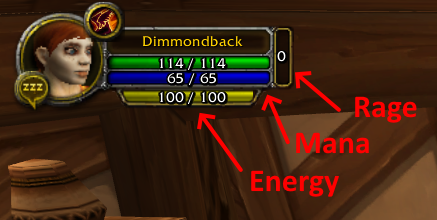
In order to cast spells and use abilities, your character has access to 3 key resources:
- Mana: Represented by the blue bar. By default will slowly regenerate after 5 seconds of not using mana. Maximum increases with level and with bonuses to Intellect
- Energy: Represented by the yellow bar. Regenerates quickly. Default maximum is 100
- Rage: Represented by the red bar. Increases when dealing auto-attack damage, taking damage, and by casting damaging spells. Dissipates slowly when out of combat. Default maximum is 100
Buffs and Debuffs
[anchor=buffs-and-debuffs]
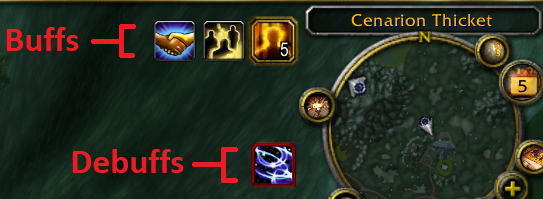
By default, your buffs (beneficial effects) and debuffs (detrimental effects) are located in the top-right corner of your screen, just to the left of your minimap.
Navigating Zones
[anchor=navigating-zones]
It’s a wide open world out there, and using your map is the key to finding your way around. Here are some quick notes regarding maps and navigating the world:
- You an access your map by pressing on the World Map button in the top-right of your minimap or by pressing the M key (by default). This will open up a map of the current zone you are in!
- You can Right-Click in your map to zoom out one layer. (Zone > Continent > Planet > Solar System)
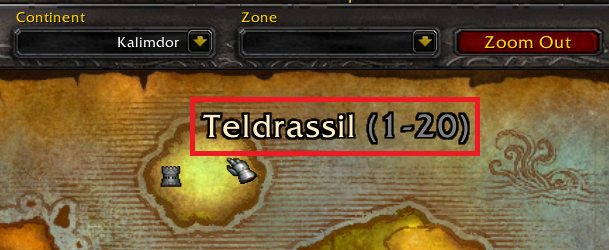
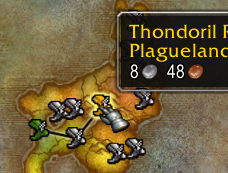
- When viewing a continent, hovering over a zone will show you the recommended level range for that zone! (See example below)
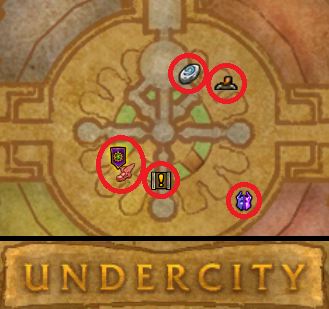
- You can see points of interest while viewing the zone’s map (See example below)
- Towns and cities can easily be found when viewing the zone’s map (See example below)
- Demonic Gateways in Outland can get you to out-of-reach places if you do not have a flying mount
- Exploring all areas of a zone gives you an achievement!
Catch a Ride! (Mounts)
[anchor=catch-a-ride]
The world is a big place and mounts can help you get there quickly! Here’s some handy notes regarding mounts:
- {?} All characters should now start with the ability to summon mounts from Level 1, provided you have bought a mount to ride
- You can improve your mount speed by talking to riding trainers from level 6 onwards! 60% ground speed costs 4 gold and 100% ground speed costs 80 gold
- Once you have reached Outlands and are level 70, you can fly in Outlands by learning mounted flying from a trainer for 1000 gold. Flying mount trainers can be located in Thrallmar, Honor Hold, Shadowmoon Village, and Wildhammer Stronghold. (Note: Requires a flying-capable mount!)
- Learning advanced (280%) and expert (310%) flying speed training costs 5000 gold each
Flight Masters
[anchor=flight-masters]
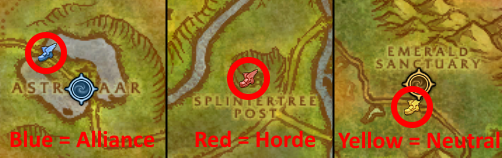
In cities and in towns, you can usually find Flight Masters! You can also locate them on your Zone Map with a winged boot icon. Flight Masters act as fast-travel options for a small fee to fly to your desired destination. Flight masters you have not yet talked to will have a ! above their head!
Note: You must interact with a Flight Master to unlock flying to and from that destination!
Leveling up skills
[anchor=leveling-up-skills]
Every even level, your character may be eligible to level up and upgrade your skills! Here are some ways you can level up your skills:
- In every major city, you can find class trainers that can level up skills associated with that class. You may ask guards for directions
- You may use another player’s Book of Ascension (or variant) and learn skills from every class trainer from it
- If you summon your own Book of Ascension (or variant) or have it summoned while leveling, you will automatically learn all available skills
Note: Some skills can also upgrade into completely new skills such as Frost Armor into Ice Armor and Demon Skin into Demon Armor!
Professions
[anchor=professions]
Characters may choose to partake in crafting and gathering professions. Professions can be helpful in making gear, applying powerful enchants, and making money. Players are able to learn 2 primary professions by default but may learn all 4 secondary professions. Guardian of Time sells a
Craftsman's Codex for 2500 gold that allows you to permanently learn an additional profession! You may also purchase these tomes from the Auction House. It is possible to learn every profession at the same time!
Primary Professions :
- [skill=171] Brew helpful potions and powerful elixirs for buffs. Compliment profession is [skill=182]
- [skill=164] Create heavy (mail and plate) armor and weapons. Compliment profession is [skill=186]
- [skill=333] Break down uncommon, rare, and epic items into magical essences to apply helpful enchants to gear
- [skill=202] Construct explosives and gadgets. Compliment profession is [skill=186]
- [skill=182] Pick herbs and flowers throughout the world. Allows you to track herbs and see them on your minimap
- [skill=755] Craft jewelry, trinkets, and socketable gems. Allows you to break down ore into gems. Compliment profession is [skill=186]
- [skill=165] Stitch together medium armor (leather and some mail) as well as some enchants. Compliment profession is [skill=393]
- [skill=186] ROCK AND STONE! Gather ore and gems from veins in the world. Allows you to track veins and see them on your minimap
- [skill=393] Carve beasts into usable leather
- [skill=197] Sew together cloth to make clothing and bags
Secondary Professions :
- [skill=185] Become a chef and create foods that give buffs.
 Chef's Hat not included
 - [skill=129] Use cloth to make bandages and heal yourself and allies quickly
- [skill=356] Cast your line and get some fish and maybe some other goodies
- [skill=732] Chop trees and refine logs into planks. (No complimentary profession yet)
The Soulbound Mechanic
[anchor=the-soulbound-mechanic]
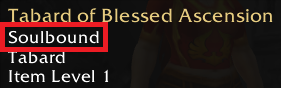
During your journey you will encounter some items that have the « Soulbound » tag. These items cannot be traded to other players nor can they be sent to your other characters via mail. These items, however, may be stored in your bank.
The Auction House
[anchor=auction-house]
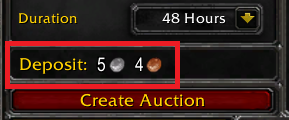
In every major city, there are Auction Houses where you may buy and sell items. Do note that selling items has an auction tax associated with posting the item and with successfully selling it. The Auction House is also very useful for finding Vanity items to add to your collection, such as Book of Ascension!
Guards can point you to where the Auction House is in every city.
The Bank
[anchor=the-bank]
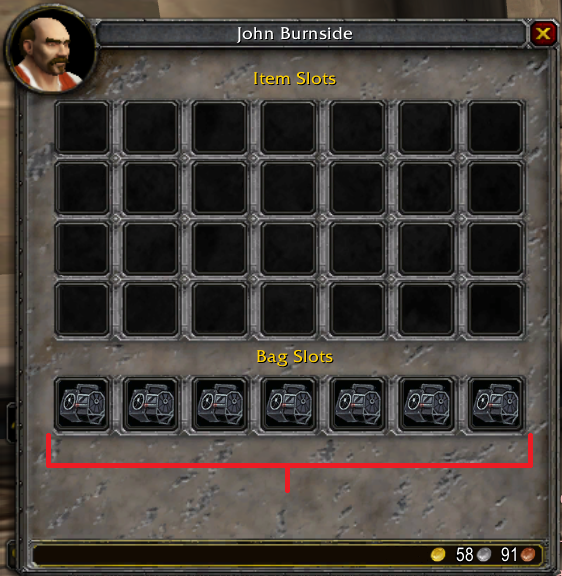
Every major city also has a bank you may access. All banks are shared and are character-specific. You may also purchase additional bank bag slots and place bags in them to expand your bank’s storage space (See image below). The Treasure Keeper companion also serves as a mobile bank and is usable in any town as well as major city. (You cannot access your bank outside of towns and cities)
Guards can point you to where the Bank is in every city.
Freepick Learning Skills
[anchor=freepick-learning-skills]
This section only applies if you are not following a Hero Architect / Featured build and are instead using Freepick Mode!
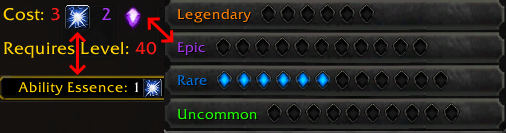
Upon reaching Level 10 and each level afterwards, you will be awarded one  Ability Essence and one
  Talent Essence. You can spend these on learning new abilities and new talents! You may find your current number of Ability and Talent essences in your Character Advancement Menu (N by default). Buying skills also incurs a rarity-cost. Your available points are shown in the bottom-right of that menu.
Companions
[anchor=companions]
Journeying through the world can get lonely sometimes. To help with that, you can get yourself some companions. From cats Siamese Cat to dogs Corgi Pup to floating heads Wondrous Wisdomball, there’s a companion out there just for you.
Note: Some companions also have utility value such as the Book of Artisans!
The Leveling Journey
[anchor=the-leveling-journey]
Note: You may freely swap your Archetype / Featured Build if you are level 9 or below. Afterwards, you cannot swap and can only deactivate it to switch to Freepick Mode! (Switching to Freepick Mode will also stop you from getting additional rewards for playing as an Archetype / Featured Build)
Open World
[anchor=open-world-leveling]
In the open world you will be adventuring from town to town, zone to zone, exploring, killing, looting, and questing on your journey to reach the maximum level. Here are some open world leveling tips:
- Quests in Azeroth give huge experience rewards. They also scale to always give an appropriate amount
- Azeroth Quests can also reward you with an
Adventurer's Cache which gives level-appropriate equipment
- Some areas in zones have an XP+ icon. Killing mobs in this area grants double the kill experience
- Logging out in a rested area (Major cities and inside of inns) will give you Rested XP. This give you double mob kill experience (Stacks with other effects)
- Mobs will give plenty of loot. Sometimes too much. It is strongly recommended to get some bags early and to upgrade them whenever possible
- Training for better mount speeds will make open world leveling much faster
- Partying up with other players can help with completing quests faster. If a mob drops a quest item, it will drop it for every person in the party!
{?} PVP
[anchor=pvp-leveling]
If you prefer to fight other players instead, then you can level up through PVP. Participating in battlegrounds rewards you with  Honor Points and
  Battleground Spoils.
Battlegrounds Available:
- [zone=3358] Capture and Control
- [zone=3277] Capture the Flag
- [zone=6051] Grab and Hold
- [zone=3820] Capture and Control + Capture the Flag
- [zone=2597] Base Siege
- [zone=7107] Team Deathmatch
Dungeon Finder
[anchor=dungeon-finder-leveling]
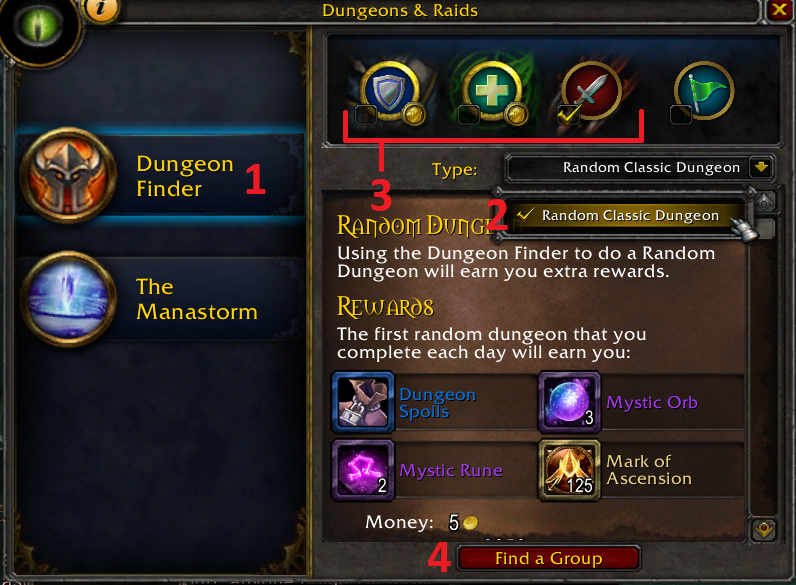
Random Dungeon Finder in Ascension works differently compared to it’s modern counterpart. In Ascension, the dungeons players queue into scale the mobs to the player’s level and many dungeons are separated into parts where players only need to slay one boss. Completing a dungeon can award players with a Dungeon Spoils. To queue for a dungeon follow the steps below:
- Reach level 15 or higher
- Open the Activities Menu (I by default)
- 1 Select Dungeon Finder
- 2 Select your desired dungeons (or random dungeon)
- 3 Select your role. (Please do not lie and pick a non-appropriate role)
- 4 Click « Find a Group »
Manastorm
[anchor=manastorm-leveling]
The Manastorm is an {?} infinite deep-dungeon you can use to level as well. Here are some quick notes about the Manastorm:
- You are dropped into a modified portion of a dungeon where your target is a boss marked with a:
- Check your inventory. You are given 3 useful Manastorm-specific potions
-
Endless Manastorm Potion is infinitely reusable and has a 6 second cooldown
-
 Millhouse's Magical Escape is also infinitely reusable!
 - Killing mobs before you engage the boss will also weaken the boss!
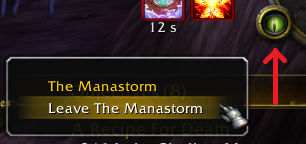
- You may leave the Manstorm anytime by Right-Clicking the dungeon eye icon on your minimap and selecting « Leave the Manastorm »
- Completing floors in the Manastorm can reward you with a
Manastorm Cache
- You can open up your map (M by default) and see a skull icon on your map to locate the boss
- Your progress is saved every 5th level (Completing 5,10, 15, etc lets you start at 6, 11,16, etc)
- As you delve deeper into the Manastorm, the dungeon’s usual denizens will be replaced with random mobs
- As you progress, mobs may gain affixes and on-death effects. THESE EFFECTS HURT. AVOID THEM!
- If you or anyone in your group reaches level cap, the group will be transported to the Endgame version of Manastorm. You will need to regroup without the maximum level player to return to the Leveling version of Manastorm!
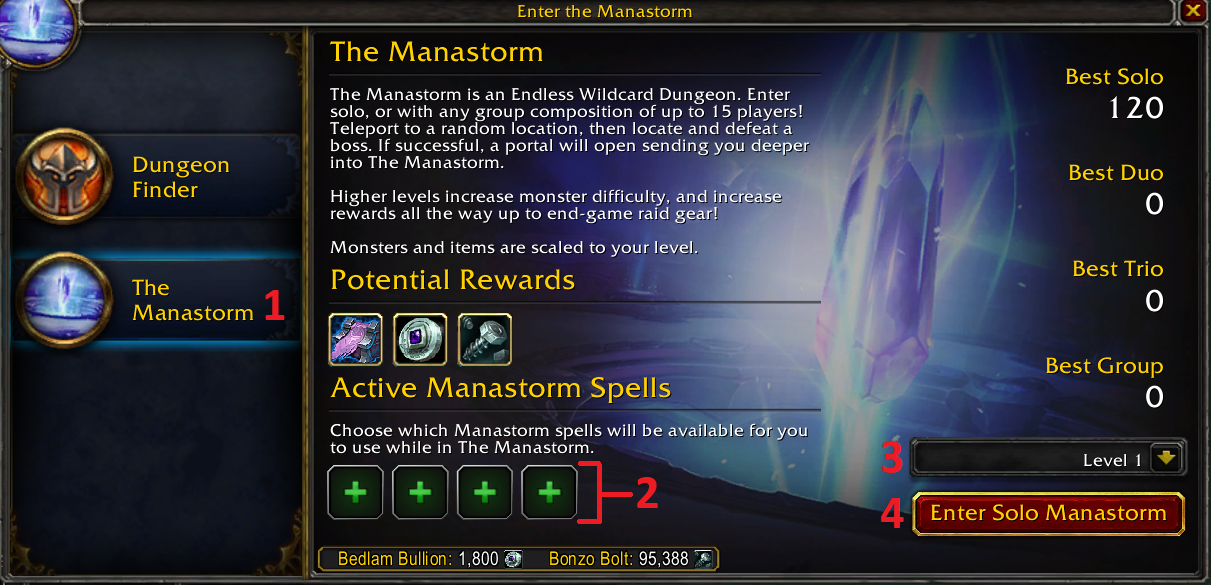
To queue up for the Manastorm follow the steps below:
- Reach level 10 or higher
- Open the Activities Menu (I by default)
- 1 Select The Manastorm
- 2 Equip any Manastorm-specific potions you have acquired from
Millhouse Manastorm
- 3 Select your starting floor
- 4 Click « Enter Manastorm »
Endgame Activities
[anchor=endgame-activities]
Callboard Dailies
[anchor=callboard-dailies]
One of the activities you can do when you reach the level cap is to do Callboard Dailies. There are a wide variety of them with different categories! Upon opening the Callboard you can find these general categories on the left-hand side (PVE, PVP, Professions, etc). Here are quick notes about the Callboard:
- Callboard Dailies operate on a charge system, where you can hold up to one week’s worth of charges!
- Callboard Dailies are an amazing source of
 Mark of Ascension
 - Always make sure you always equip the highest item level gear you have before you open any
Callboard Cache /
Callboard Cache
- Supposedly {?}
Callboard Cache has given people gear as high as item level 150
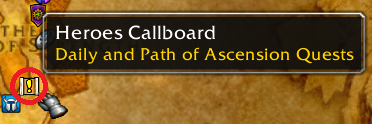
- You can find callboards in cities by their map icon (example below)

1: Total rewards for turn in per time turned in !
2: Number of charges remaining for this quest (Sometimes shared with other quests)
3: Buy one completion using Bazaar Token
4: Buy one completion using gold
Prestiging
[anchor=prestiging-endgame]
An alternate route to getting gear is by prestiging! Talk to Chromie to learn more. Here are quick notes about prestiging:
- This will reset your character back to level 1 and award you with Mark of Ascension,
 Token of Prestige, and a
  Prestigious Cache!
 - Upon prestiging you will also receive a prestige daily quest! This cycles daily between Prestige: Battlegrounds, Prestige: Dungeons, and Prestige: Open World and will grant more rewards from Chromie upon completion (limit 1 per day)
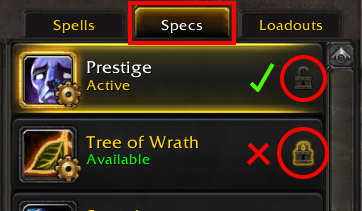
- Requires that your current specialization is unlocked before you can prestige (See below for what your Character Advancement screen’s specialization tab should look like)
- You are able to prestige at 60+ but you cannot turn in the additional quest until you reach level cap!
- You can also prestige to participate in Trials to earn their rewards! See the Trial Mega Guide for more information
- Token of Prestige can be used to purchase heirlooms and special cosmetics from Chromie!
{?} Mythic+
[anchor=mythic-plus]
Another avenue of upgrading your gear is by running Mythic+ Dungeons. Here are some quick notes about Mythic+:
- Awards
 Mythic Coin upon completion which is spendable at
 Edrim Skysong
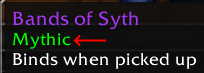
- Mythic Coins can be used to purchase or upgrade dungeon (non-raid) gear with the Mythic keyword (See below for example)
- To host your Mythic+ dungeon you will need a Keystone given to you from a
Mythical Keystone Cache
- Some keystones also award bonus coins upon completion!
{?} Endgame PVP
[anchor=endgame-pvp]
If you prefer to fight other players, then you have 3 forms of PVP that you can engage in!
Note: If you have spare PVE gear lying around and you wished it could be viable for PVP, look no further than the Bloody Jar that can be purchased from
Guardian of Time.
Bloodforging items is IRREVERSIBLE and costs a lot of gold!
Battlegrounds
Fight other players in open battleground PVP. Participating in battlegrounds rewards you with Honor Points and Battleground Spoils.
Battlegrounds Available:
- [zone=3358] Capture and Control
- [zone=3277] Capture the Flag
- [zone=6051] Grab and Hold
- [zone=3820] Capture and Control + Capture the Flag
- [zone=2597] Base Siege
- [zone=7107] Team Deathmatch
Arena
Fight others in honorable duels in the arena to earn Arena Points. Available modes are Skirmish and Rated with 1v1, 2v2, and 3v3 arena sizes available. Sometimes the Arena Frenzy event will happen that will also award more Arena Points for participation!
High-Risk
This is Ascension’s « Extraction » PVEVP game mode. In this you will explore the open world to fight mobs and other players to obtain High-Risk-only materials, bloodforged PVP gear, and other useful items. But be warned, should you be slain, other players can take the items in your inventory or even the gear you were wearing!
See Ascension’s official High-Risk Explanation for more information
{?} Raiding
[anchor=raiding]
Just like in original WoW you can also raid as part of the endgame! This time with significant improvements. Here are some quick notes about raiding:
- Raids are no longer instance-locked and instead, your character will be boss-locked. This means you can join one raid, kill some bosses, then join another to kill the rest, and still be eligible for loot from the unkilled bosses in the 2nd instance! (Note: You will still only be eligible for one set of loot per boss across all instances)
- Raids now have Heroic, Mythic, and Ascended difficulties!
- You can also tweak raid difficulty and rewards with the new Raid Trial system
- Earn
 Raider's Commendation and spend them at
 Romus the Redeemer to buy raid gear!
Endgame Manastorm
[anchor=endgame-manastorm]
Manastorm at level cap is significantly more difficult than its leveling counterpart. In addition to monsters gaining affixes, players will also gain affix debuffs that will make things harder for them! However, endgame Manastorm is extremely lucrative and can offer a deterministic way to obtain high-level gear! Here are some additional notes regarding endgame Manastorm:
- Awards progressively better rewards as you delve deeper starting with
Manastorm Cache: TBC Normal Dungeons and going all the way up to
Manastorm Cache: Mythic Sunwell Plateau
- Awards
Bedlam Bullion for each new floor cleared in each group size
- Bedlam Bullion’s can be spent at
Millhouse Manastorm for cosmetics and other vanity items
- Awards
Bonzo Bolt for each cleared level (can be repeat levels)
- Bonzo Bolts can be spent at
Cogsworth for Manastorm-specific upgrades and potions
- Has a special surprise at level 1000!
- Can be joined solo, as a duo, as a trio, and as a group (4-15 members)
To queue up for the Manastorm follow the steps below:
- Open the Activities Menu (I by default)
- 1 Select The Manastorm
- 2 Equip any Manastorm-specific potions you have acquired from
Millhouse Manastorm
- 3 Select your starting floor
- 4 Click « Enter Manastorm »
Ascension Specific Changes / Mechanics
[anchor=ascension-specific-changes]
Classless
[anchor=classless]
In Ascension, you may pick and choose skills and talents from any of the original WoW classes. Each skill and talent has an associated cost (See example below). You may find your current number of Ability and Talent essences in your Character Advancement Menu (N by default). Your currently used and available rarity points are shown in the bottom-right of the same menu.
You’re allowed to pick skills and talents from any class so long as you meet the following:
- Have the requisite Ability Essence and / or Talent Essence
- Meet the level requirement
- Have enough rarity points available to obtain that skill / talent
Should you wish you make changes to your current build, you may:
- Talk to
Guardian of Time to complete the quest
Hero Architect: Scroll of Unlearning – (Repeatable) and receive some
 Scroll of Talent Unlearning
(Note: Despite saying « Talent Unlearning » in the name, it does allow you to also unlearn skills!) - This quest is only available if you have less than 10 scrolls (Note: You may complete the quest, unlearn one ability to be at 9 scrolls, then complete it again to be at 19)
- Should you want to stockpile even more, you may purchase them from Nozdormu for Mark of Ascension
- You may also purchase
 Ability Purge and
  Talent Purge for complete skill / talent unlearning
Mystic Enchants
[anchor=mystic-enchants]
Mystic Enchants are Ascension’s premier character customization system. With Mystic Enchants (previously called Random Enchants), you can enhance your character with new active and passive abilities, as well as allowing for completely new playstyles. From a Tundra Hunter to a Steward of Eternity, there’s a Mystic Enchant out there that’s just right for you.
Top-level notes about Mystic Enchants:
- You can look at your currently applied Mystic Enchants and collection from the tab in the Character Advancement menu (N by default)
- Many skills granted by enchants will disable the required original skill (Example: Having Hoplite and learning Sinister Strike will teach you Thrust and disable Sinister Strike)
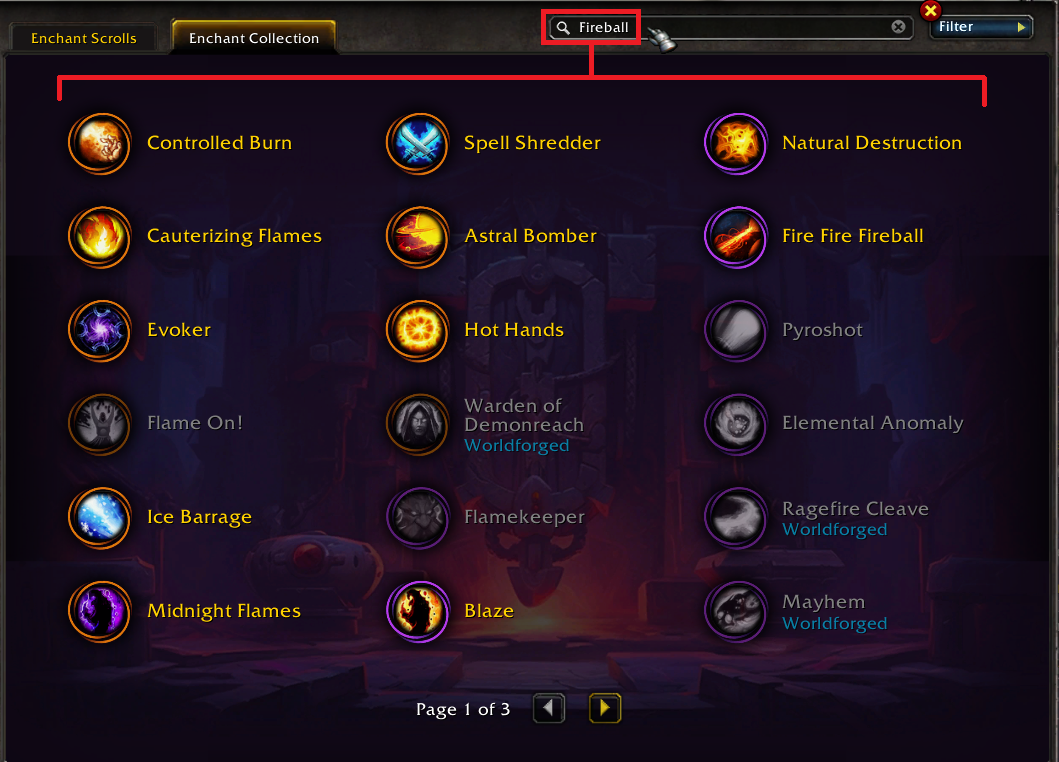
- You can search for any keywords or spells / abilities to show all Mystic Enchants that have / affect them! (See image below for example)
- While many enchants can be bought and traded, many other Worldforged enchants must be obtained yourself!
- Worldforged enchants are found throughout the world, from specific boss drops, purchasing from Shady Dealers, to even entire questlines!
- Many (not all) Worldforged enchants can be obtained from a
Worldforged Cache in an appropriate area, usually nearby
-
Worldforged Cache require a
Worldforged Key to open. Obtain 5x
Worldforged Key Fragment to make a Key
- See the ability-specific enchant list below for details regarding Fighter / Wizard / Primal / Demonic / Necrotic / Draconic / Element-bound / Gigantic enchants
- You can unlock multiple Mystic Enchant specializations to save and reapply them whenever you want without a
Mystic Enchanting Altar
Notes about applying Mystic Enchants:
- You can apply Mystic Enchants while interacting with a
Mystic Enchanting Altar (or a variant)
- There are 4 permanent altars in the world. You can locate them using their icons on the Continent / Planet map
- You may equip 1 Legendary, 3 Epic, and 13 Rare and / or Uncommon enchants at the same time
- You can save enchants to your collection by using a
 Mystic Draught at an altar (Purchasable from
 Guardian of Time)
- Applying enchants from your collection cost Mark of Ascension while at an altar. (3500 for Legendary, 1500 for Epic, 1000 for Rare, and 500 for Uncommon)
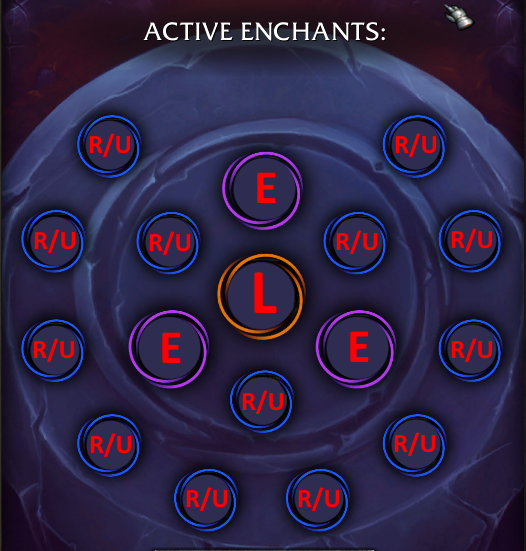
Ability-specific Worldforged Enchant Notes:
- You are only allowed to equip 3 total ability-specific Worldforged enchants
- Applies to all versions of the skill! (Such Demonic Fireball affecting both Fireball and Cauterizing Fire)
- Using the scroll will teach you an enchant from a random chosen ability you currently have learned!
-
 Fighter's Mystic Scroll Dropped by Humanoids without a mana bar
 - Wizard's Mystic Scroll Dropped by Humanoids with a mana bar
- Primal Mystic Scroll Dropped by Beasts
- Necrotic Mystic Scroll Dropped by Undead
- Element-Bound Mystic Scroll Dropped by Elementals
- Draconic Mystic Scroll Dropped by Dragonkin
- Demonic Mystic Scroll Dropped by Demons
- Gigantic Mystic Scroll Dropped by Giants
Vanity Items
[anchor=vanity-items]
In Ascension, there are account-wide items you can infinitely reobtain by using the Vanity tab of your Character Advancement Menu (N by default). The Vanity Collection is also where you can spend your Seasonal Points to purchase new vanity items! If you are playing on a seasonal realm, use the Vanity Collection Sync to reobtain your Vanity Collection and Transmogs on the seasonal realm. This process is automatic for Area-52 characters.
Vanity items include things such as:
- Heirlooms
- Pets
- Mounts
- Manastorm upgrades
- Miscellaneous utility items (Such as
Mystic Enchanting Altar)
- Bundles and Caches (Such as
 Fel Enchanted Warchest)
 - Skill tomes and Stones of Retreat
- Pet whistles
- Vanity armor and weapons
- Character effects
Multi-spec
[anchor=multi-spec]
In Ascension you can have multiple specializations / builds on a single character. You may find your specializations in your Character Advancement menu (N by default) in the top-right corner.
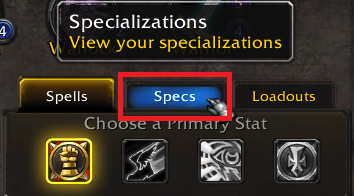
Here are some quick notes about specializations:
- Each character can have up to 20 different specializations
- Each specialization can also be assigned a gear set and a mythic enchant set
- You can lock specializations so you cannot accidentally prestige while using them
-
Guardian of Time sells a
 Tome of Specialization II for 1000 gold
 - Alternatively you may purchase Tome of Specialization II from an Honor Quartermaster in any major city for 68,200 Honor Points
- All specialization unlock books (including 2) can be purchased from the Auction House or the WebStore
Cross-Faction
[anchor=cross-faction]
In Ascension, all players belong to a faction but those factions aren’t as restrictive as they were in the original WoW. Despite being on opposite factions, players may speak to each other, party up, and even quest together! Just make sure to part ways to your respective towns when turning in quests as NPCs will still attack players of the opposite faction.
Transmogs / Wardrobe
[anchor=transmogs-wardrobe]
Transmogs (the tab being called « Wardrobe » in Ascension) is available with appearances being account-wide! You may access the Wardrobe Tab from the Character Advancement Menu (N by default). All armors and weapons can be transformed into other armors and weapons with the 2 exceptions below:
- Weapons cannot take on the appearance of Off-Hand and Shield type items and likewise, they cannot take on the appearance of weapons
- Bows, Crossbows, and Guns cannot take on the appearance of Wands and likewise, Wands cannot take on the appearance of non-Wand weapons
If you have learned the vanity item / appearance of a pet and you have the appropriate Tame Pet skill, you may swap your current pet into the learned pet using the « Pets » tab in « Wardrobe ».
Note: Pet restrictions still apply where exotic pets require the Beast Mastery talent and you cannot have your pet swap to other types of pets (Ex: Undead cannot swap to Elementals)
If you are playing on a seasonal realm, you can reobtain your appearance and vanity collection using a Vanity Collection Sync. This process is automatic for characters on Area-52.
Reputation
[anchor=reputation]
Reputation is now account-wide (per server)! Gains and losses on one character now apply to all characters on that server. Because you are able to prestige, quests are theoretically infinitely repeatable, meaning you can keep prestiging and doing quests to achieve Exalted status with any faction just through questing!
NOTE: Using the  Faction Change Potion will not convert faction-specific reputations to their counterpart and you will have to regain reputation with them (Ex:
  The Consortium will [b]not be converted into
  The Consortium) [/b]
Manastorm
[anchor=manastorm-mechanics]
The Manastorm is an {?} infinite deep-dungeon you can use to level as well as obtain gear, cosmetics, and vanity items from. There are currently 2 versions of Manastorm, a Leveling and Endgame version. Here are some notes about the Manastorm combined from both sections:
- You are dropped into a modified portion of a dungeon where your target is a boss marked with a:
- You may leave the Manstorm anytime by Right-Clicking the dungeon eye icon on your minimap and selecting « Leave the Manastorm »
- Upon entering, you are given 3 infinitely-reusable potions that will help you progress
- You can open up your map (M by default) and see a skull icon on your map to locate the boss
- Killing mobs before you engage the boss will also weaken the boss!
- Your progress is saved every 5th level (Completing 5,10, 15, etc lets you start at 6, 11,16, etc)
- As you delve deeper into the Manastorm, the dungeon’s usual denizens will be replaced with random mobs
- As you progress, mobs may gain affixes and on-death effects. THESE EFFECTS HURT. AVOID THEM!
- In endgame Manastorm, players also gain debuff affixes as they progress. THESE EFFECTS HURT. AVOID THEM!
- Awards
Bedlam Bullion for each new floor cleared in each group size
- Bedlam Bullion’s can be spent at
Millhouse Manastorm for cosmetics and other vanity items
- Awards
Bonzo Bolt for each cleared level (can be repeat levels)
- Bonzo Bolts can be spent at
Cogsworth for Manastorm-specific upgrades and potions
- Endgame Manastorm has a special surprise at level 1000!
- Can be joined solo, as a duo, as a trio, and as a group (4-15 members)
To queue up for the Manastorm follow the steps below:
- Prerequisite: Achieve level 10 or higher
- Open the Activities Menu (I by default)
- 1 Select The Manastorm
- 2 Equip any Manastorm-specific potions you have acquired from
Millhouse Manastorm
- 3 Select your starting floor
- 4 Click « Enter Manastorm »
Hero Architect
[anchor=hero-architect]
In Ascension, you may use the built-in Hero Architect Tab in your Character Advancement Menu (N by default) to view and apply builds submitted by Ascension and other players! The Archetype system uses builds from the Featured tab. Leveling from 1 to level cap using a featured build will permanently learn all of that build’s mystic enchants as well as reward you with a Build Master's Trophy which can be exchanged at
Challenger Ildrailya for cosmetic and vanity items!
Open World Changes
[anchor=open-world-changes]
The open world in Ascension has numerous changes. Here are some quick notes about those changes:
- Azeroth mobs will scale with the player’s level up to 3 levels lower than the player’s level
- Starting zones will only scale mobs up to level 20
- Many Azeroth quests will give an
Adventurer's Cache that will give level-scaled gear
- All quests will scale to the player’s level and give appropriate experience
- Areas in the open world will have an XP+ icon. Killing mobs in this area grants double kill experience
Dungeon Finder Scaling
[anchor=dungeon-finder-scaling]
When using the Dungeon Finder activity (I by default), if you select « Random Classic Dungeon » and queue into the dungeon, the following will occur:
- Mobs will appropriately scale to your level (Note: This is similar to modern WoW)
- You may be teleported into a deeper part of the dungeon to slay a single boss
- Equipment from the dungeon will scale to your level. Normal lootables unaffected
- Currently, Outland / Burning Crusade dungeons do not have a « random » selector until you reach level cap
Profession Exp
[anchor=profession-exp]
All professions will grant the player experience so long as the player has not reached the maximum skill level allowed. (Example: You will not gain experience when mining a vein if your [skill=186] skill is at 75 and you have not learned Journeyman Mining to increase the maximum to 150).
Multiprofession
[anchor=multiprofession]
In Ascension it is possible to learn more than 2 primary professions. Guardian of Time sells a
Craftsman's Codex for 2500 gold that allows you to permanently learn an additional profession! You may also purchase these tomes from the Auction House. It is possible to learn every profession at the same time! Professions, skill levels, and recipes are retained when you prestige.
Motherlodes
[anchor=motherlodes]
Occasionally, Motherlodes will spawn in the world. These are large gathering nodes that requires 2 or more players in order to mine. They can give varying resources and can be mined a lot of times. There are currently only [skill=186] and [skill=182] motherlodes with the following:
-
Fel Iron Motherlode
-
Adamantite Motherlode
-
Khorium Motherlode
-
Felweed Motherlode
-
Dreaming Glory Motherlode
-
Ragveil Motherlode
-
Terocone Motherlode
-
Flame Cap Motherlode
-
Netherbloom Motherlode
-
Nightmare Vine Motherlode
-
Mana Thistle Motherlode
Trials / Challenges
[anchor=trials-challenges]
Hardcore mode and other such challenges are now built-in to Ascension! They offer  Trial Master's Trophy and many other unique rewards for successfully completing them. Check out The Trial Mega Guide for more information on them!
End Credits Cutscene
Thank you if you made it this far. Hopefully you found the guide enjoyable and helpful. If there’s something you’d like me to add or change to the guide (or just want to say thanks), please let me know in the comments down below.
Until next time!
Adapted from a guide by Dimmondback published on db.ascension.gg.



0 Commentaires
Aucun commentaire pour le moment. Soyez le premier à commenter !