This guide to getting started in WoW Forever follows my video from October 29, 2026, step by step, from character creation to max level. The screenshots come from the beta: some menus may move at launch, overnight from November 4 to 5, 2026.
WoW Forever is billed as a fresh start. Blizzard wants to recreate what happened in 2009, with a different story and an improved concept, while keeping the spirit of classic Vanilla. The dungeons are redone, the loot too, the classes as well, and the Paladin comes to the Horde side.
Leveling is still long, and that is part of the intended experience. You will need a Battle.net account and an active World of Warcraft subscription, about 13 € a month.
Choosing Your Server to Start in WoW Forever
On first launch, the game offers Normal or PvP. Two other types exist on the official version, roleplay and hardcore servers, but they are not available on the beta yet. On the original hardcore servers, a dead character was lost for good. From what I understand, here you get it back, but on a normal server (to be checked at launch).
The difference between Normal and PvP comes down to the colored zones on the map. On a PvP server, they read like this:
| Color | Zone type | What can happen |
|---|---|---|
| Orange | Contested | You can get attacked. |
| Red | Enemy territory | You cannot attack first, but they can. |
| Green | Your side | You decide whether or not to attack the opposing faction passing by. |
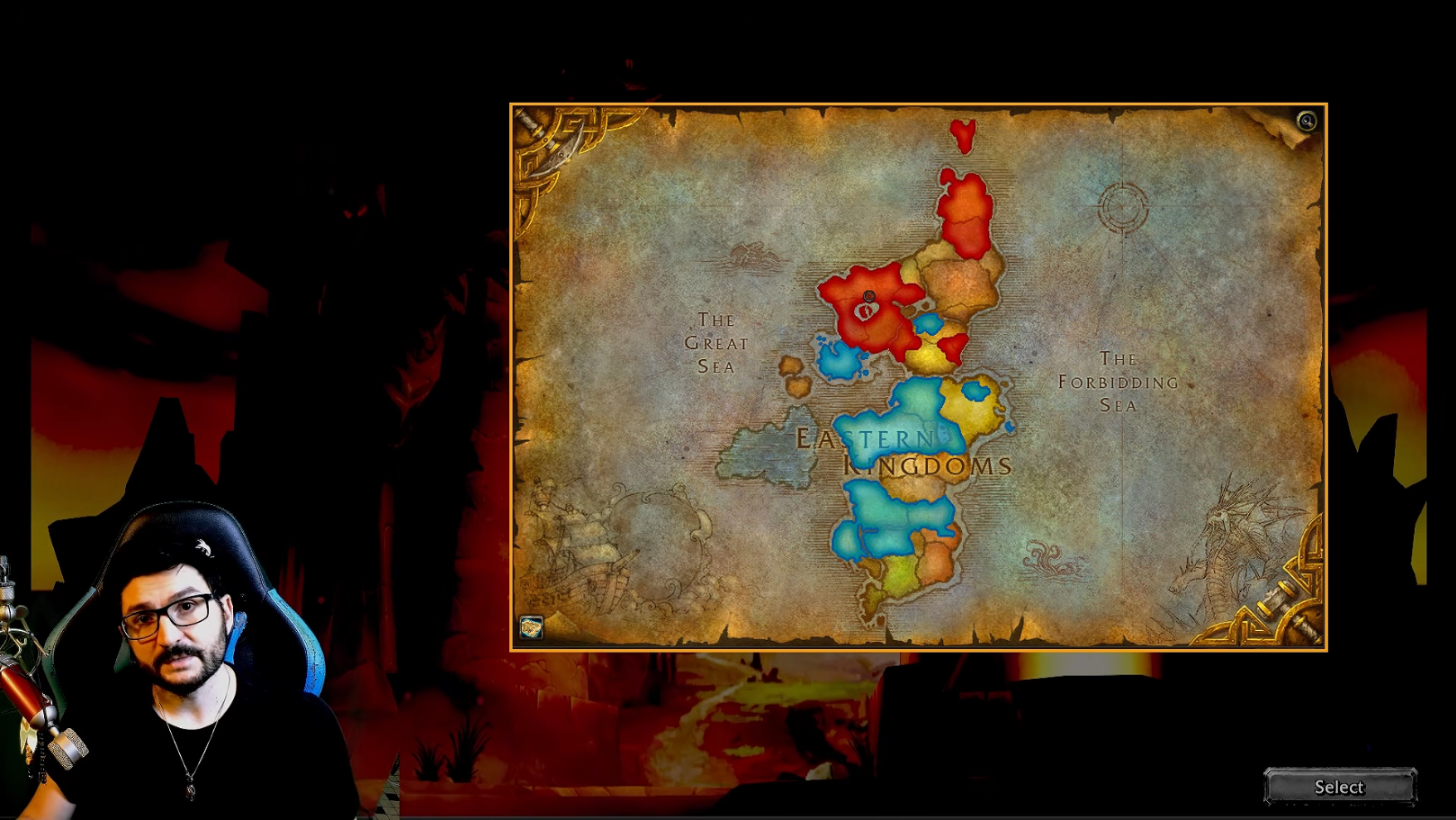
Green zones are often low-level areas, hence the protection. For a peaceful time, pick a Normal server: you will still play battlegrounds later. If you like a good brawl and the Horde versus Alliance rivalry, PvP gives you big battles, guilds that organize events and a world I find more alive, even if it can be frustrating.
Now for character creation. My opinions on each specialization are in my guide to choosing a class, and the official page gives few details on races: the breakdown of the racial bonuses, with cooldowns and effects, is on my site. Your server choice cannot be redone: I covered the rule sets (Normal, PvP, roleplay) in a dedicated article.
Language, French Servers and Layers
Once logged in, the first reflex when starting WoW Forever is to open the options. At the bottom, you pick the text and audio language. I set English on the beta, which makes addons (add-on modules) easier. With a French launcher, everything should be French by default.
The other important setting is called Social. Its job is to keep you with French players: servers are grouped by language, and the « Preferred Online Language » menu lets you switch, for example to English-speaking servers while keeping the game in French. The change forces a 24-hour wait, shown on screen (« One day cooldown »).
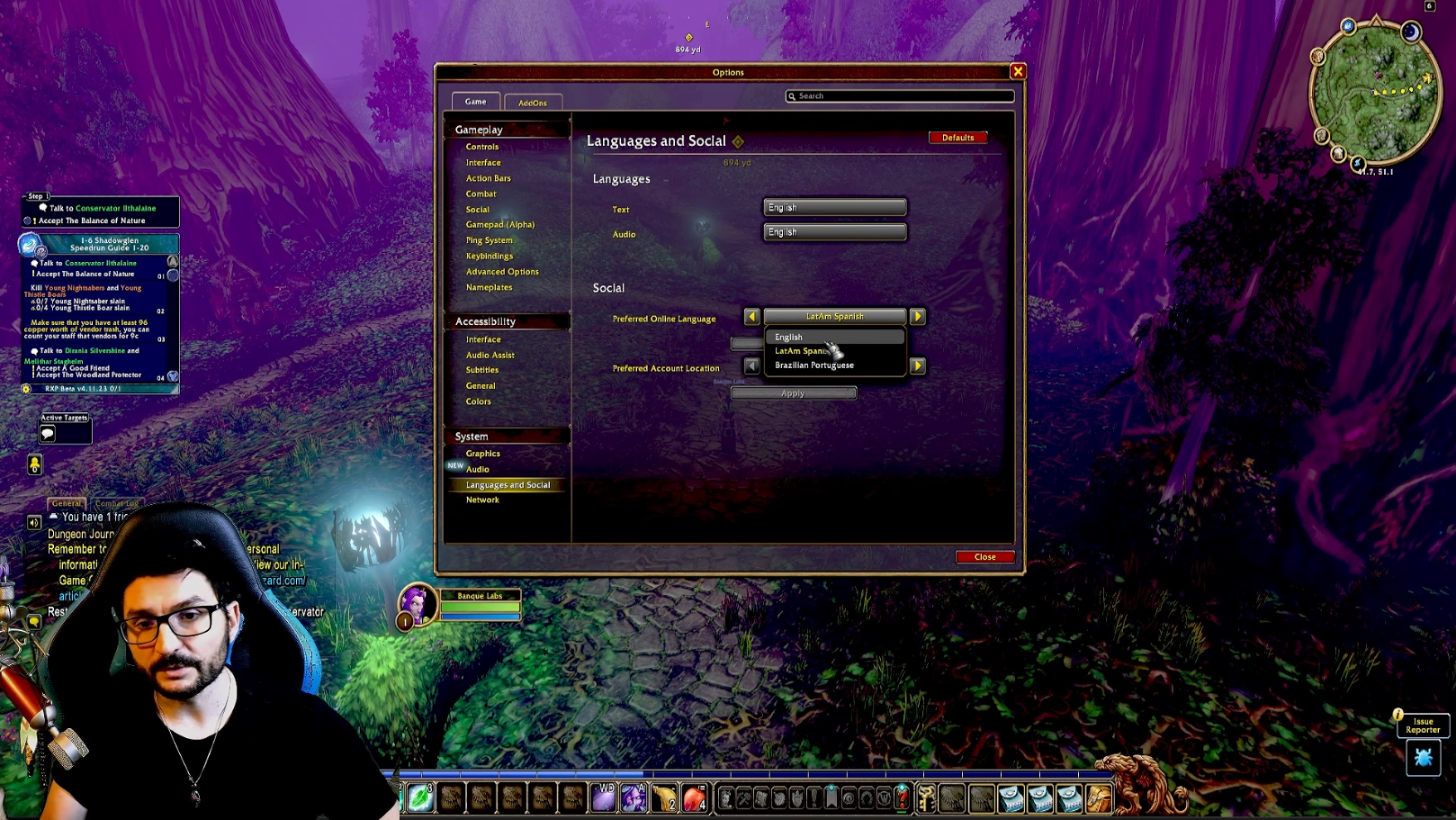
In practice, you will play on one huge French mega-server. A layer (a parallel copy of the server) still spreads players out, but each one can hold far more than before. So I expect few of them, except at launch. A layer switch makes the players around you vanish and reappear. On the beta, it happened once or twice in two weeks, far less painful than on other classic versions.
Blizzard announced that you will preferably be placed in the layers of your guild, your friends and the players you often meet. Blizzard’s layering fixes are covered in another article. On performance, if you put everything on ultra, Ctrl+R shows the frames per second at the bottom right.
Movement Keys: Strafing and Backpedaling
Before any fight, I open the key bindings. I set movement first: forward, backward, strafe left, strafe right. Strafing (the sidestep) lets you shift position without turning your character. Holding right click then steers the camera and the character with the mouse. This duo gives you the mobility you need in PvE and PvP alike: it is the foundation for starting WoW Forever.
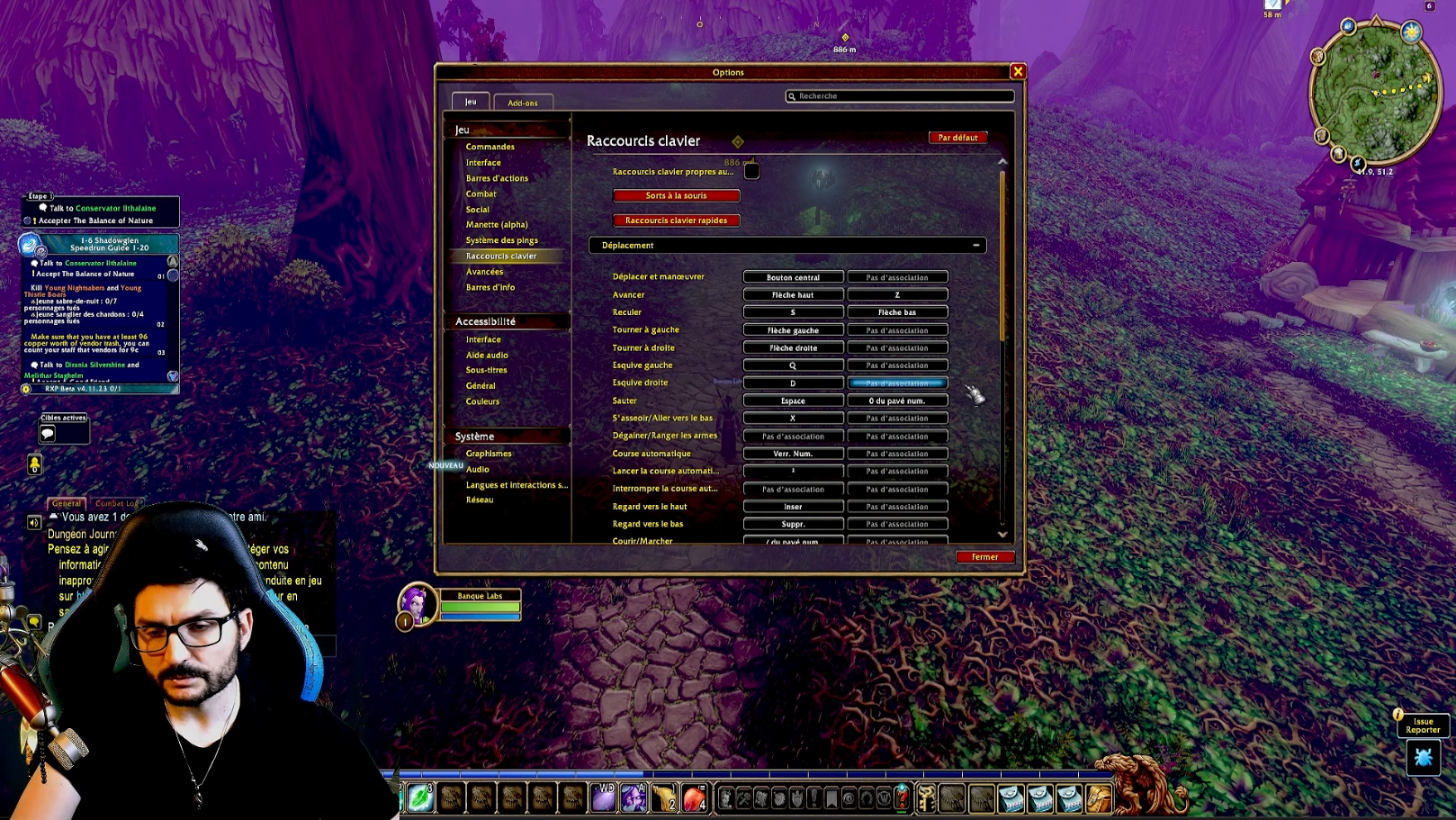
Backpedaling has a bad reputation, because lost PvP players do it out of reflex. It still has a use for tanks. Your character only defends against attacks coming from the front: behind you, in a 180° half circle, it has no dodge or parry. A tank who runs with their back to the monsters to position them loses all their defensive effects, which can kill them on a big pack or in a raid. Backpedaling keeps them facing the monsters: I keep that key for this reason.
I advise against turning with the keyboard keys, such as the arrows or the numpad. You turn with the mouse and move with strafes. Turning by keyboard hurts your responsiveness in raids and in PvP.
Daze and Aggro Reset: The Two Mechanics That Kill
These two mechanics matter as soon as you want to start WoW Forever. Many players, even experienced ones, handle them poorly, and in hardcore they kill easily. I ran the test on a higher-level beta character, because at the very first levels Daze does not seem to exist.
Daze is a debuff that slows you down. It can trigger when a monster hits you in the back while you flee, especially if its level is well above yours. In my test, I estimate the chance at 20 or 30% per hit, without certainty. No effect that frees you from slows removes it:  Blessing of Freedom does nothing. Only full immunities work, like
  Divine Shield, my « bubble ».
Backpedaling in a straight line slows you down. Strafing keeps you at full speed. Your hitbox (the area where a hit lands on you) stays turned toward the monster while you leave the area, and it does not hit you in the back. In my test, I strafed right, left, then right: the monster let go without dazing me.
The aggro reset (aggro is the monster’s attention on you) follows a different logic. Each monster has a starting zone, a big circle: once you are outside it, it starts a countdown before giving up the chase. Any action from you restarts that countdown: an attack, even a missed one, a heal, a buff, or an aggro spell like  Faerie Fire. In my demonstration, by stopping all actions, the two monsters chasing me went back.
To flee cleanly:
- Keep the monster in front of you and move with strafes, never turning your back on it.
- Leave its starting zone without casting any heal, buff or attack.
- Wait for its countdown to end: it returns to its origin point.
One exception holds up:  Frost Nova can stop them and spare you damage. Otherwise, limit your actions to the bare minimum.
Binding Your Spells and Setting the Camera
« Binding » a spell means assigning it a key, on the keyboard or the mouse. Many players still cast their spells by clicking the action bar: they select the target to heal, then click the heal. It works, but it holds you back. If this is your first experience on World of Warcraft, I strongly advise you to bind the action spells you use in combat, your damage rotation for example. Food and buffs can wait.
The priority order is simple. Start with the mouse buttons, the side buttons and the wheel, with modifiers like Shift or Ctrl: your fingers stay free to move. Next come the keys near Z, Q, S and D, and the further they are from them, the more they get in the way while moving. Muhshuh published a video on the priority binds for beginners, which I put in the description.
On the camera side, three settings are enough to start WoW Forever. In Controls, search for « distance » and set the maximum camera distance to the max, so you can zoom out much further. To zoom in and out, I used the plus and minus keys of the numpad, which frees the mouse wheel for spells.
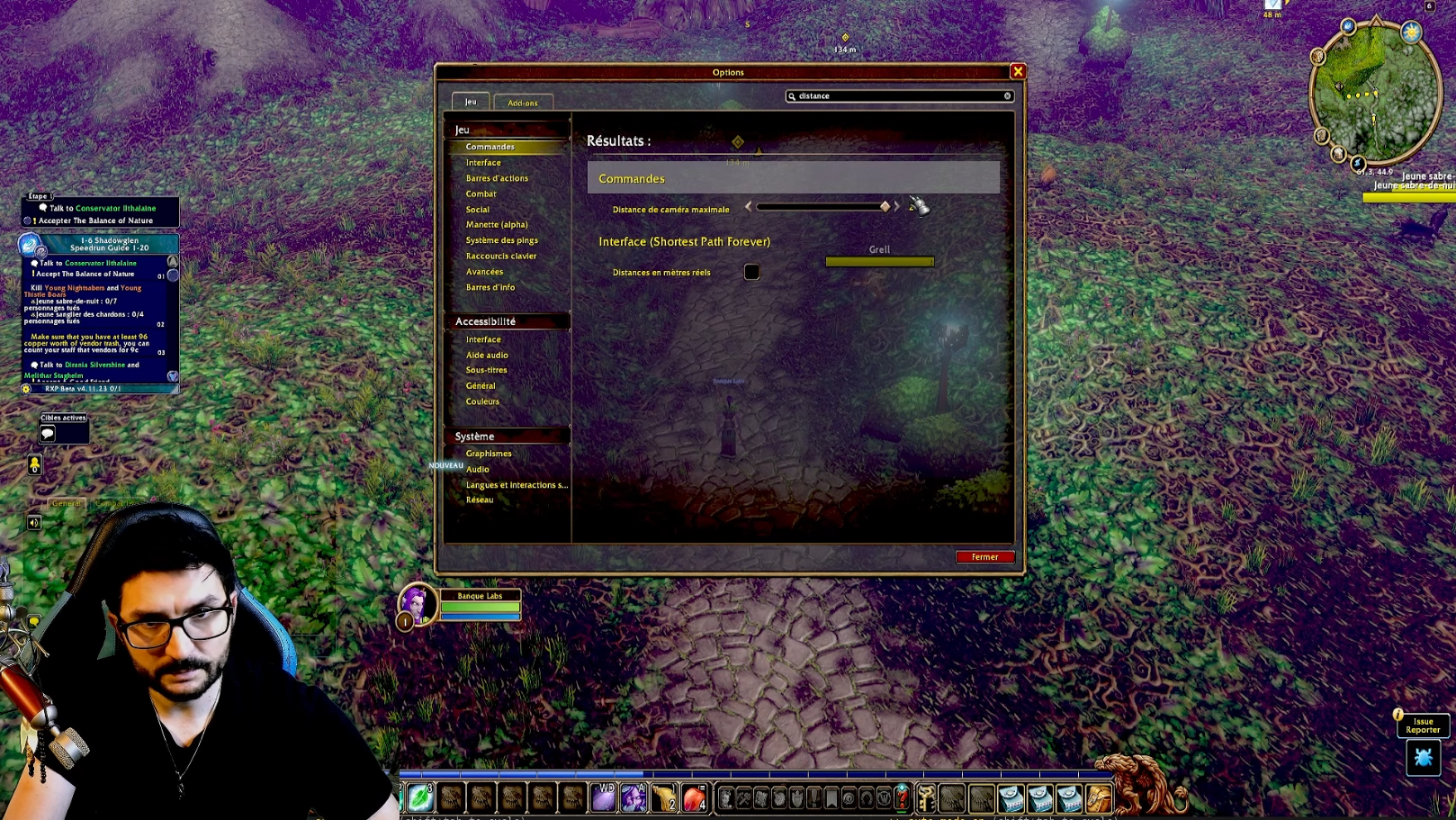
The third setting is the « Adjust camera » option, the follow style. When it is active, the camera swings back behind you on its own if you look back while moving. I find it unbearable, especially in PvP, because I want to decide myself when it turns. I always set it to « Never adjust ».
Two basic screens are worth knowing. The character sheet (C) shows your gear, your stats, your reputations and your weapon skills. Some are learned from weapon masters, found in every capital: ask a guard to point out the weapon master, and buy the skills of the different factions there so you can equip every weapon type your class can use. Using each weapon then raises its skill. The Player versus Player tab shows your rank, useful later for PvP rewards: gear, weapons, potions.
Choosing Your Professions
The K key opens the professions interface. That is where you level them, and also where a weighty choice is made: to start WoW Forever, you should pick professions that match your class. Some give a real boost to leveling. Going in the wrong direction for two or three months of leveling is costly, and I say that without exaggerating. If you have no idea what goes with your class, my profession picks by class are there precisely to guide beginners.
The setup is simple. You have two main professions, plus three basic ones: cooking, fishing and first aid.
A main profession can be dropped to learn another, but you then lose all the skill points tied to it. You also lose access to some gear. Engineering is an example: several items require an engineering skill level, and if you quit the profession, you can no longer use them.
To find a profession trainer, use the small button at the very top of the map. It shows the important NPCs (non-player characters) as yellow dots: class trainers, where you learn your abilities, and profession trainers. In a capital, guards also tell you where a specific trainer is, you just have to ask them.
I prepared complete guides to level every profession from 1 to 300. Each guide opens with a shopping list: what to buy from a vendor, what to gather or pick up at the auction house, with quantities. After that, you just follow the steps up to level 300.
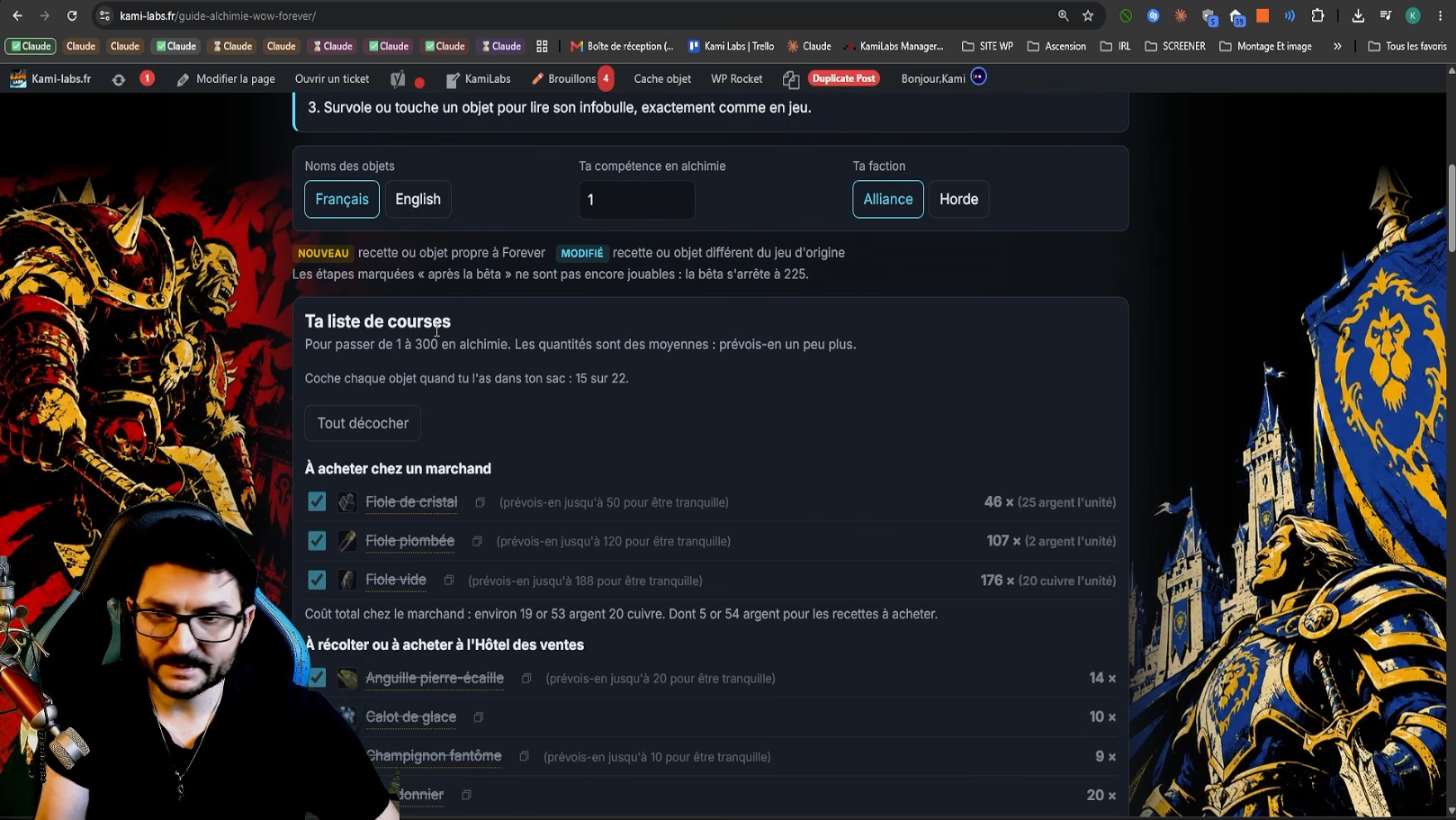
At the auction house, a click on the item copies its name. You paste it into the search, with no need to retype it.
Spellbook and Talent Tree
The Spellbook gathers all the spells you learn and unlock along the adventure. Its General tab holds the racial abilities, among other things. On my night elf character, I find  Elune’s Light, which raises critical strike chance by 10% for 15 seconds, with a 3-minute cooldown according to the on-screen tooltip. The buff (the positive effect) appears at the top right when I activate it. There is also
  Shadowmeld, which makes me invisible as long as I stand still.
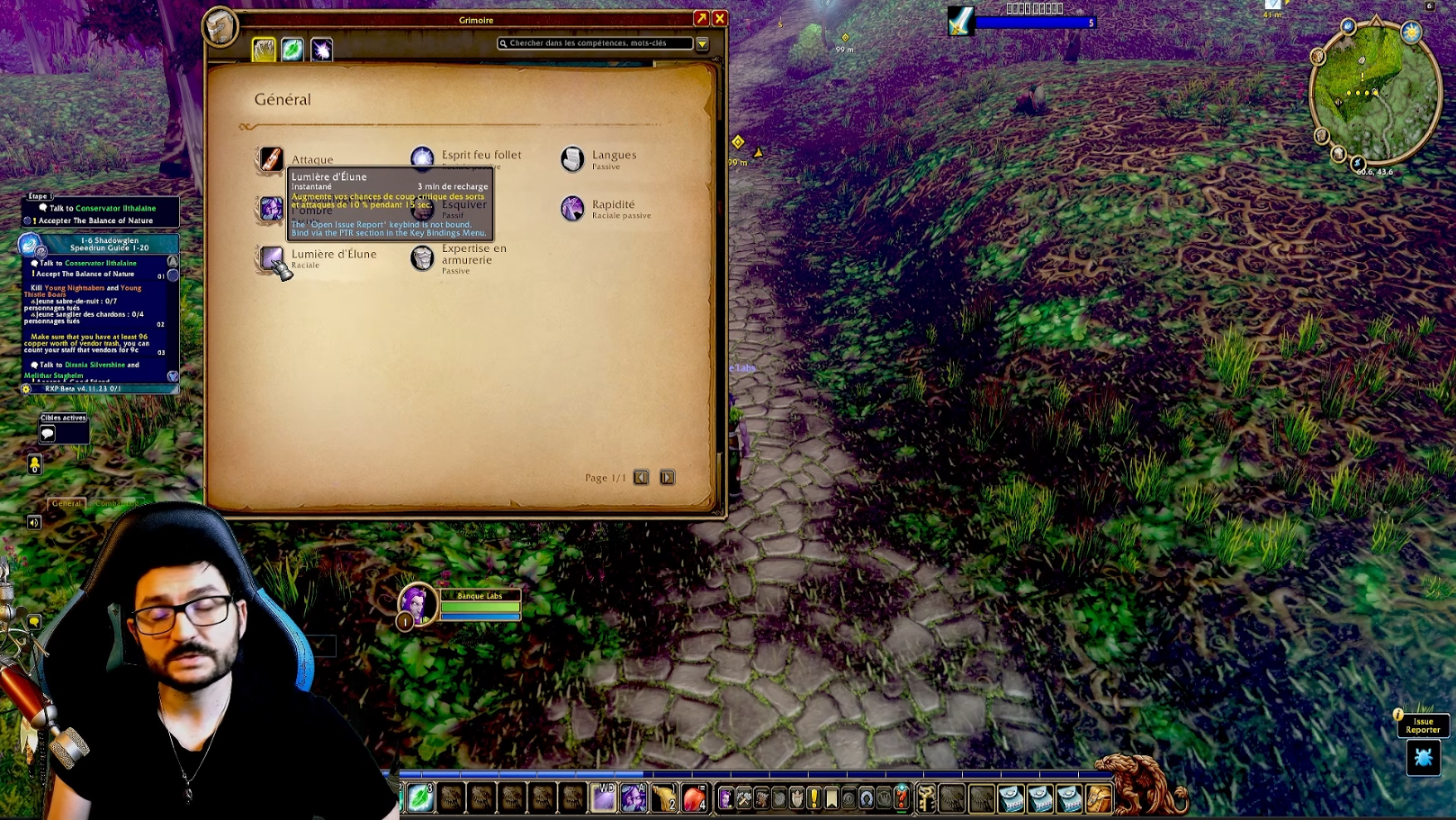
The Spellbook also offers to show all spell ranks. That sometimes helps to cast a lower-rank spell, but this option was nerfed quite a bit in the Forever version. To start WoW Forever, untick it and keep the max ranks: that is more than enough.
Once a spell is learned, you drag it to the slot of your choice. By default, a new spell places itself in a free slot of your bars, so you often have to move it. Hold the Shift key: the game then lets you drop the spell wherever you want.
The talent tree opens from level 10. Points are not easy to unlearn: you have to visit your class trainer. It costs a few silver coins at the start, then the bill climbs fast. So it is better to know where you are going before spending a point.
For that, I have a talent calculator in French. Here I go with a druid, I place my points, then I save the build. I can reload it on the fly and test several setups, which avoids mistakes in the middle of leveling. The builds by specialization give you a starting point if you do not know how to fill a tree.
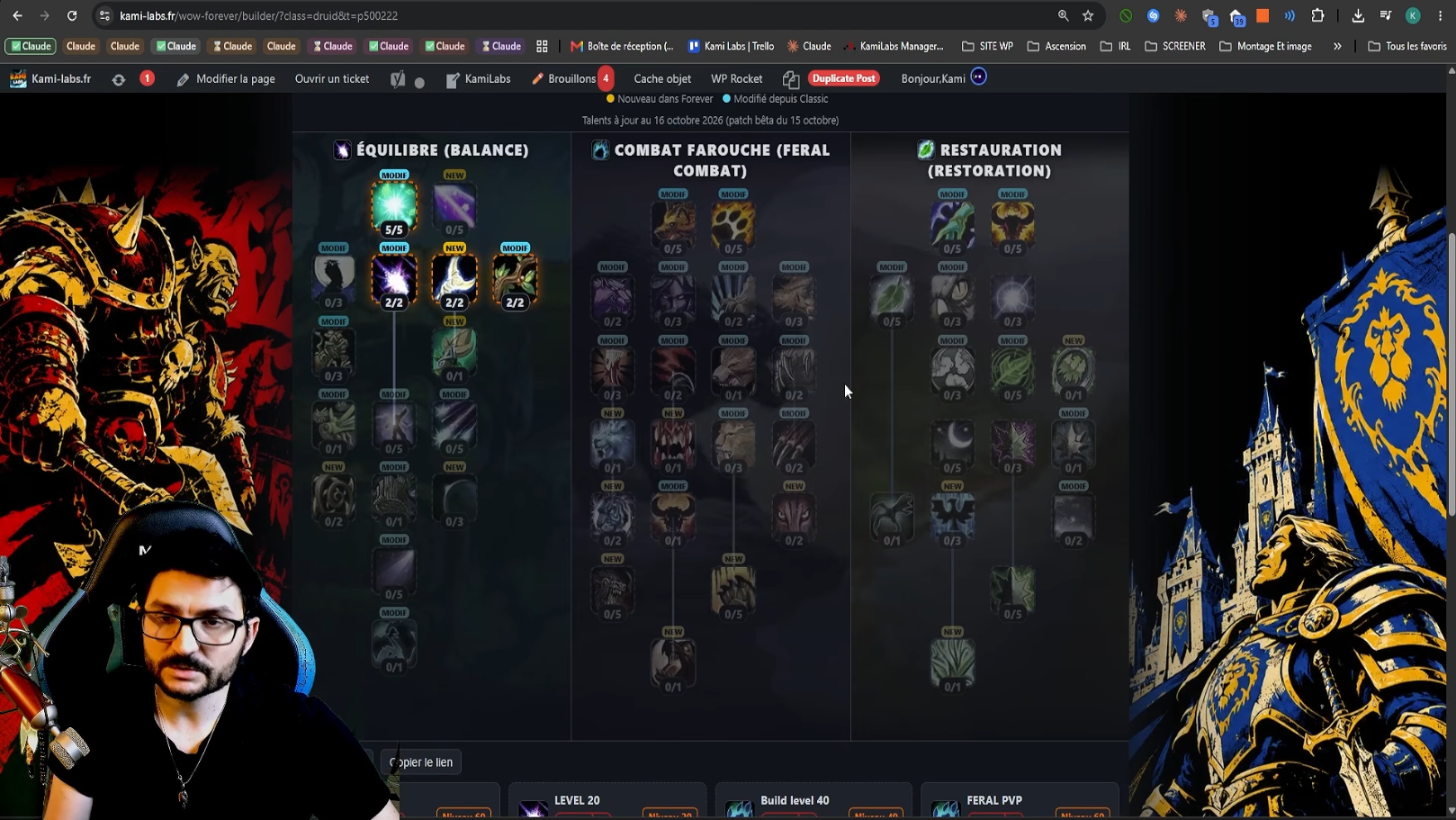
In the calculator, a yellow badge marks a talent that is new in Forever, a blue badge a talent changed from Classic. To find a specific spell outside the tree, the Forever Spellbook lists them all.
Last point: dual specialization, which lets you switch from one spec to the other, for example from Balance druid to Feral druid, at no extra cost. We think it arrives at level 40, to be confirmed on the official version, maybe at level 60. It is also possible that you will have to pay to unlock it, as in Wrath of the Lich King. We do not have much information for now.
The Legacy Tree
The next tab is the Legacy tree. It replaces the old achievement system and reworks it to make it far more interesting. You find objectives there, and each one earns you Legacy points that you then invest in the tree.
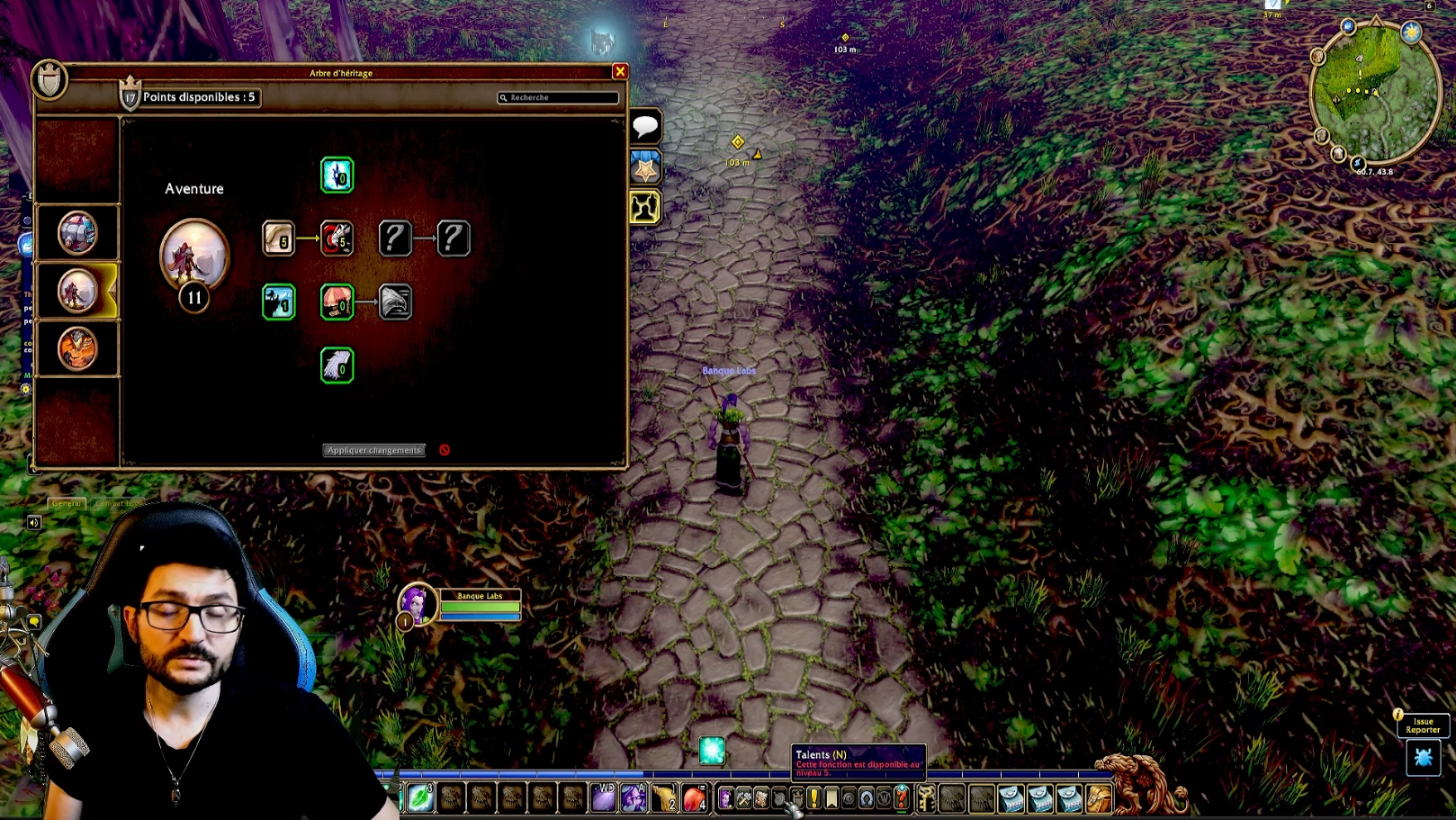
On my reroll (a second character), I have 5 points to spend. My example: by investing in one of these bonuses, talent points unlock much earlier. The Talents button tooltip now says level 5, whereas it showed level 10 a moment before. The character gets stronger faster, which speeds up leveling: a real boost for starting WoW Forever with a second character.
The core idea fits in one line: the more time you spend on your account, the more each activity (leveling, farming and the rest) pays off. Your playtime becomes more and more rewarding.
Quests, RestedXP and Guilds
The quest log has been improved: you can keep up to 40 quests in the Spellbook. Once a quest is accepted, it shows up on the map, with the zone where to do it. The quest detail shows its objectives, which you can hide.
A pacing tip for starting WoW Forever: no need to do gray quests. Green ones are tolerable when they are really easy. Aim for yellow or higher, those give the most experience.
The guidance interface you see in my screenshots is not part of the game: it is RestedXP, an addon (an interface extension) I have used for years. To me it is the best leveling help for those who want to rush, for example with limited playtime or days off taken. RestedXP is a partner of the channel. For a relaxed pace, it is not essential.
The first 20 levels are free, dungeons were recently added to its optimized routes, and a French version is announced for the WoW Forever launch. You download it directly from their official site. I covered the installation in the RestedXP installation tutorial for WoW Forever.
On guilds, yours is not created lightly: you have to go to a capital, get a charter (a parchment) and gather a certain number of signatures. If you are looking for a guild to start WoW Forever, our WoW Forever guild directory gathers the recruitment cards of 77 guilds, PvE and PvP, from chill to tryhard.
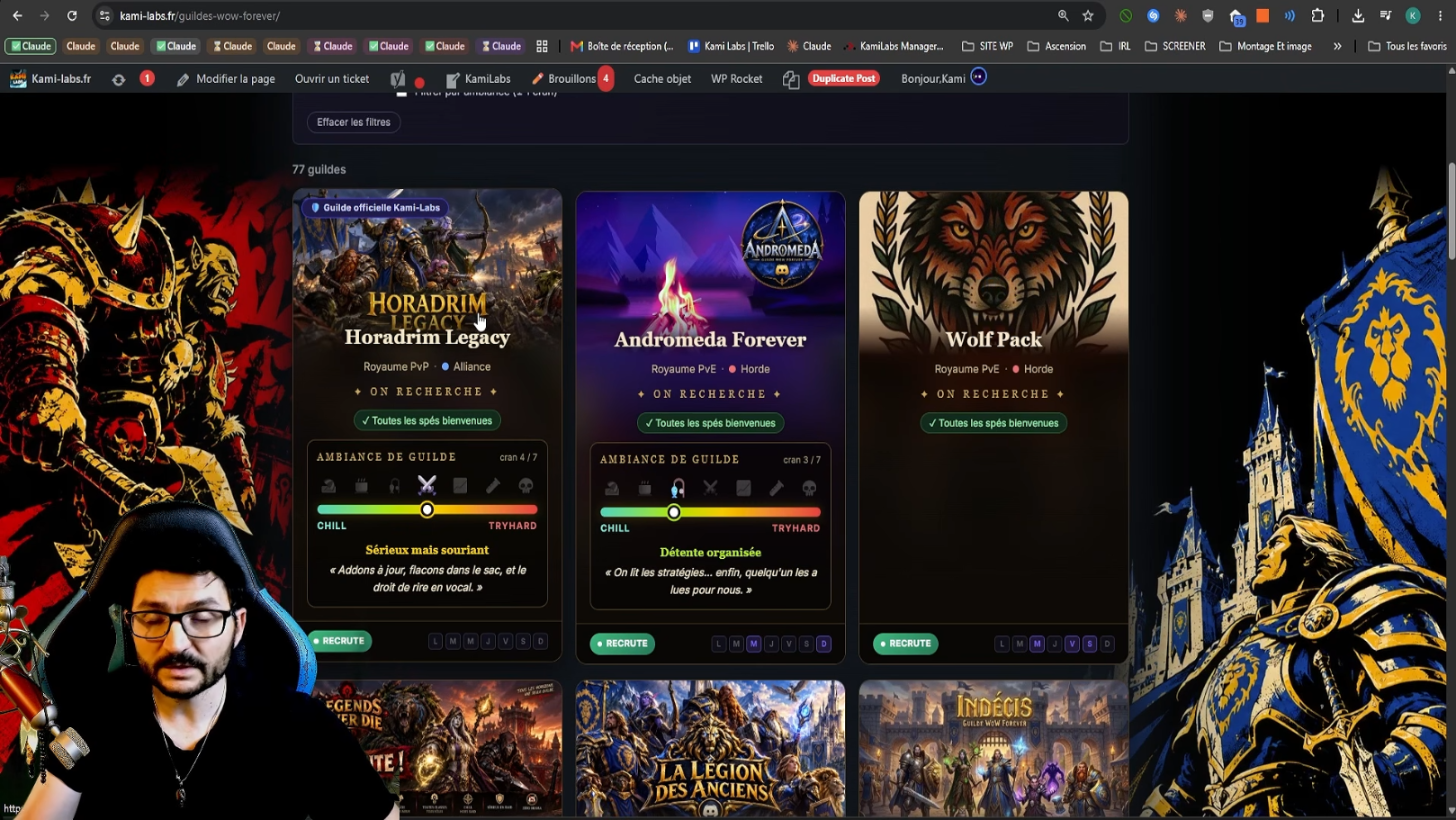
Our own PvP guild, Horadrim Legacy, will recruit during WoW Forever, even though recruitment is closed for now. I will make a video to announce the reopening.
Two interface novelties next. The collection is the transmogrification system (changing the look of your gear): you edit it in town, not on the fly, and you can disable it in the interface if you do not care about it. For bags, you keep the base backpack, which cannot be replaced, plus four normal bag slots. In the original game, they go up to 16 or even 18 slots; I do not know exactly how far they will go on Forever.
At the start, bags come as loot. Tailors can also craft them fairly quickly: if you are a beginner and do not know how to earn gold, playing a tailor and selling bags is a very good way to make gold easily. Forever finally adds a component bag, which saves space in the rest of your inventory.
Addons for Beginners
Three addons seem useful to me for starting WoW Forever: OpenMap with Shortest Path Forever, Bartender and Dungeon Journal. To find them, type the start of their name in the search of our WoW Forever addons page : it sends you to the right CurseForge page. Make sure you take the Forever version. I also gathered my addon picks for WoW Forever in a separate article.
OpenMap and Shortest Path Forever
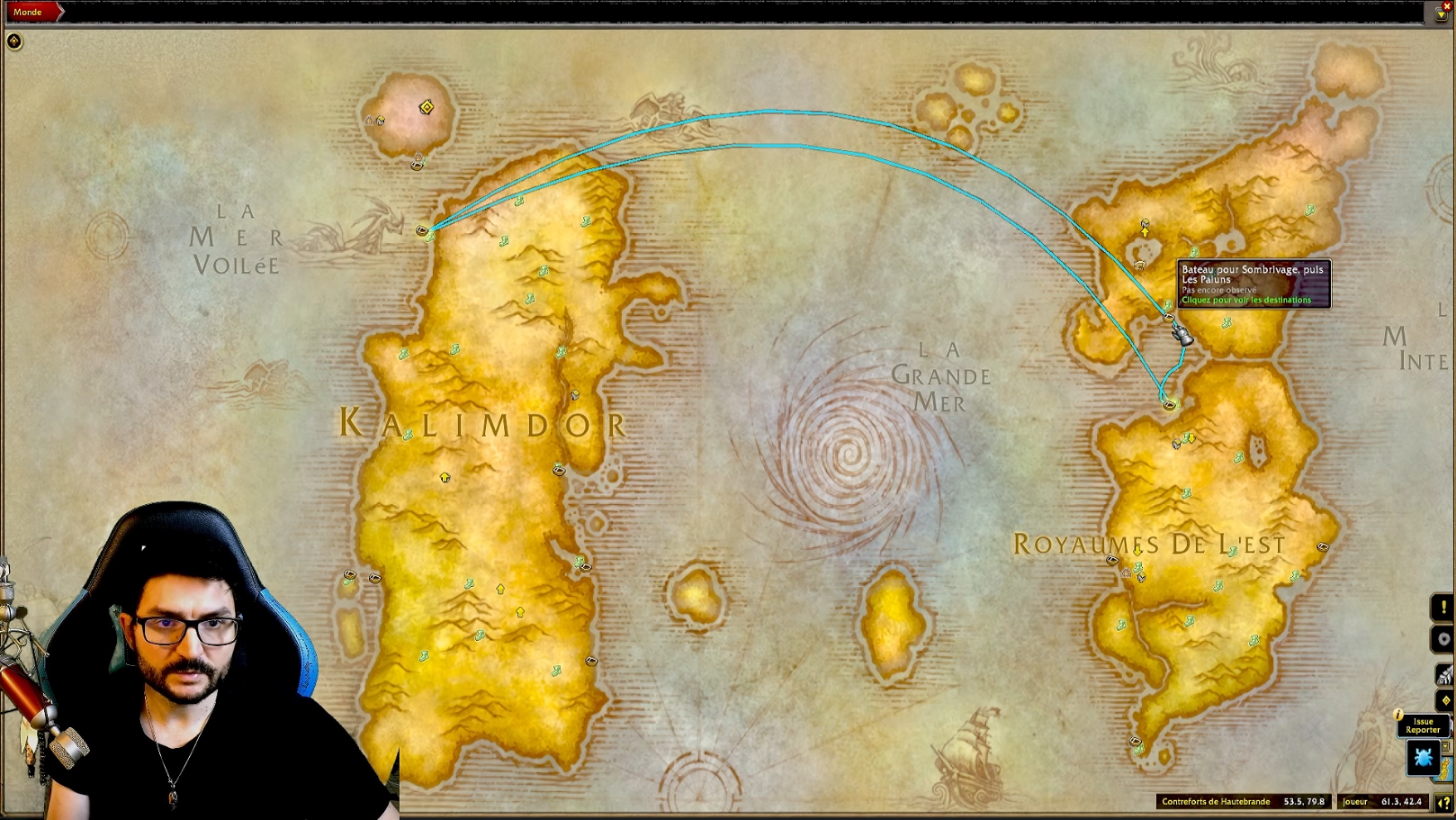
OpenMap shows the whole map: a button at the top right switches it between small and large, and you can zoom out without waiting for each zone to load. It also reveals places the base map hides, like the inside of capitals, as they appear on your minimap. It is the only way to see them.
Paired with Shortest Path Forever, it draws path points on the map, like a GPS. If a quest sends you across a continent, the addon shows the route and the boat to take. Hover over a route and you see which boat goes where.
Bartender
Type /bt in chat to open Bartender, which manages your action bars. As a beginner, you do not need to set everything: untick the lock and you can move most bars easily, like in the base interface’s edit mode. The bars managed by the addon turn green, and you can also move the health and mana bars.
Its real value for a beginner is /kb. You enter configuration mode, hover over a spell, press the key you want, and the bind (a key assignment) is done. I use it for example to put  Wrath on the 2 key. The base interface can also assign keys on the fly, but I find /kb much faster.
Dungeon Journal
Dungeon Journal lists the game’s dungeons. You see each one’s map, the quests, the position of their quest givers and the loot of each boss. For the Deadmines, which have many quests and quest chains, one click places the first one on the map: it is picked up at Sentinel Hill. That is what keeps you from getting lost.
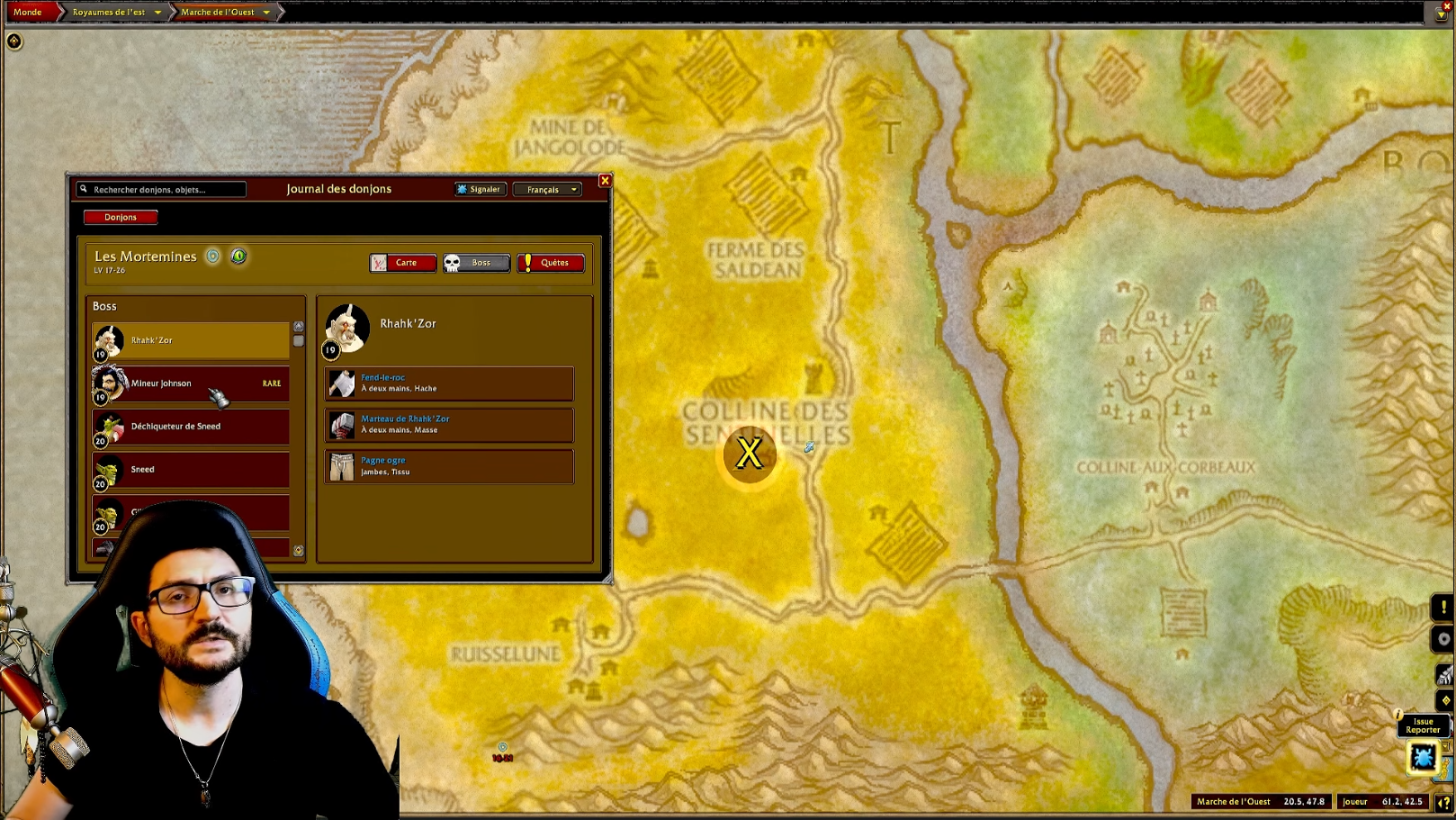
Other addons do the same thing, but this one is well organized and simple to use, even for a beginner. To locate the dungeons themselves, our WoW Forever dungeons and raids page gives the location of each instance, which the game does not always show. It also details the bosses with their loot, including the green items to farm, as well as the quests and their quest givers.
Macros: The Spell Rank Trap
When you have just started WoW Forever, this is one of the game’s most classic traps. Take Wrath: when you hover over it, the tooltip shows « rank 1 » at the bottom right. When you move on to rank 2, then rank 3 as you level up, the spell on your bar will not necessarily be replaced, even if you learned the new rank from your class trainer. I believe melee spells sometimes replace themselves, but nothing guarantees that for each one. Without checking, you risk casting a rank 1 at level 30.
The fix is the macro (a short sequence of commands that a single button runs). A macro written without a rank always casts the highest rank you know. Watch out for drag and drop: if you drag a spell from the Spellbook into the macro window, the game writes « /cast Wrath(Rank 1) » on its own. Rank 1 then stays frozen at every level up. Just delete « (Rank 1) » so the macro follows your progress.
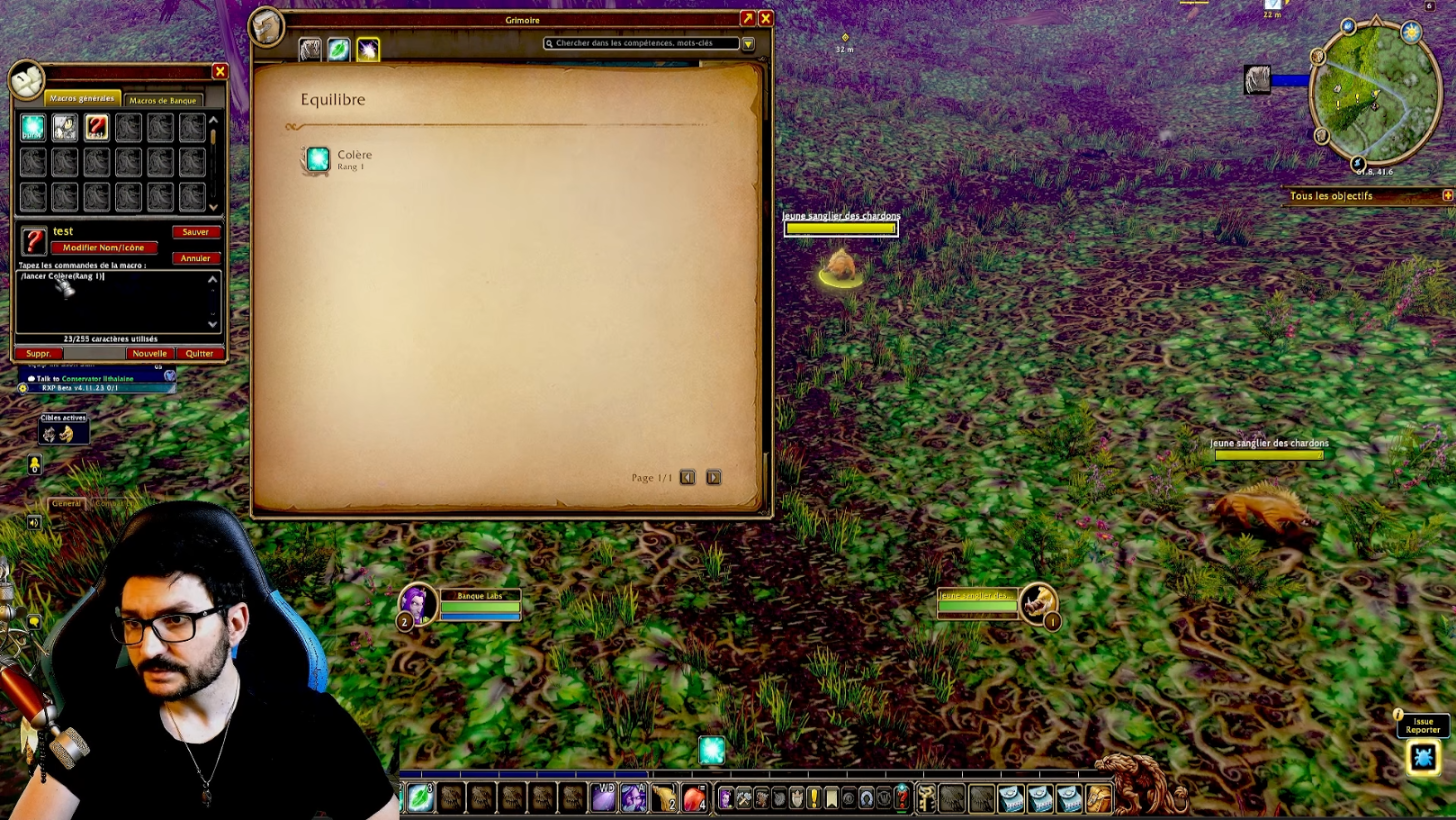
Macros also help improve your damage per second. Example on the rogue: if you do not have enough energy when you switch monsters, your  Sinister Strike does not fire, and neither do your white hits (the automatic melee attacks). The /startattack command forces them to start, whatever the target. Here is the macro, with no rank after the spell name, and #showtooltip at the top to display the spell icon and tooltip on the button:
#showtooltip
/startattack
/cast Sinister Strike
On a French client, /lancer works too instead of /cast. I gathered macros ready to copy into the game on our Forever macros page, explained as you unlock spells.
Leveling Up and Preparing for Endgame
The best source of experience when starting WoW Forever is quests. The experience from monsters has been reduced on Forever, so quests weigh even more. RestedXP remains, in my eyes, the most efficient tool for leveling fast, and it also optimizes dungeons.
Dungeons are the second big source of experience. Before going in, pick up all the dungeon’s quests: they give huge XP bonuses and very strong items, which speed up the rest of your leveling. The Dungeon Journal is there precisely so you forget nothing before committing.
Go in at the right level. A dungeon listed as 13-20 is better done at level 15-16. The bigger the level gap with the monsters, the more they hit you and hurt you, and the more you miss or lose crits. Orange or red monsters will make you of little use: as damage you will do little, and as a tank you will struggle to hold threat while taking a lot of damage. Aim for yellow monsters. Green ones are fine if you only do the quests.
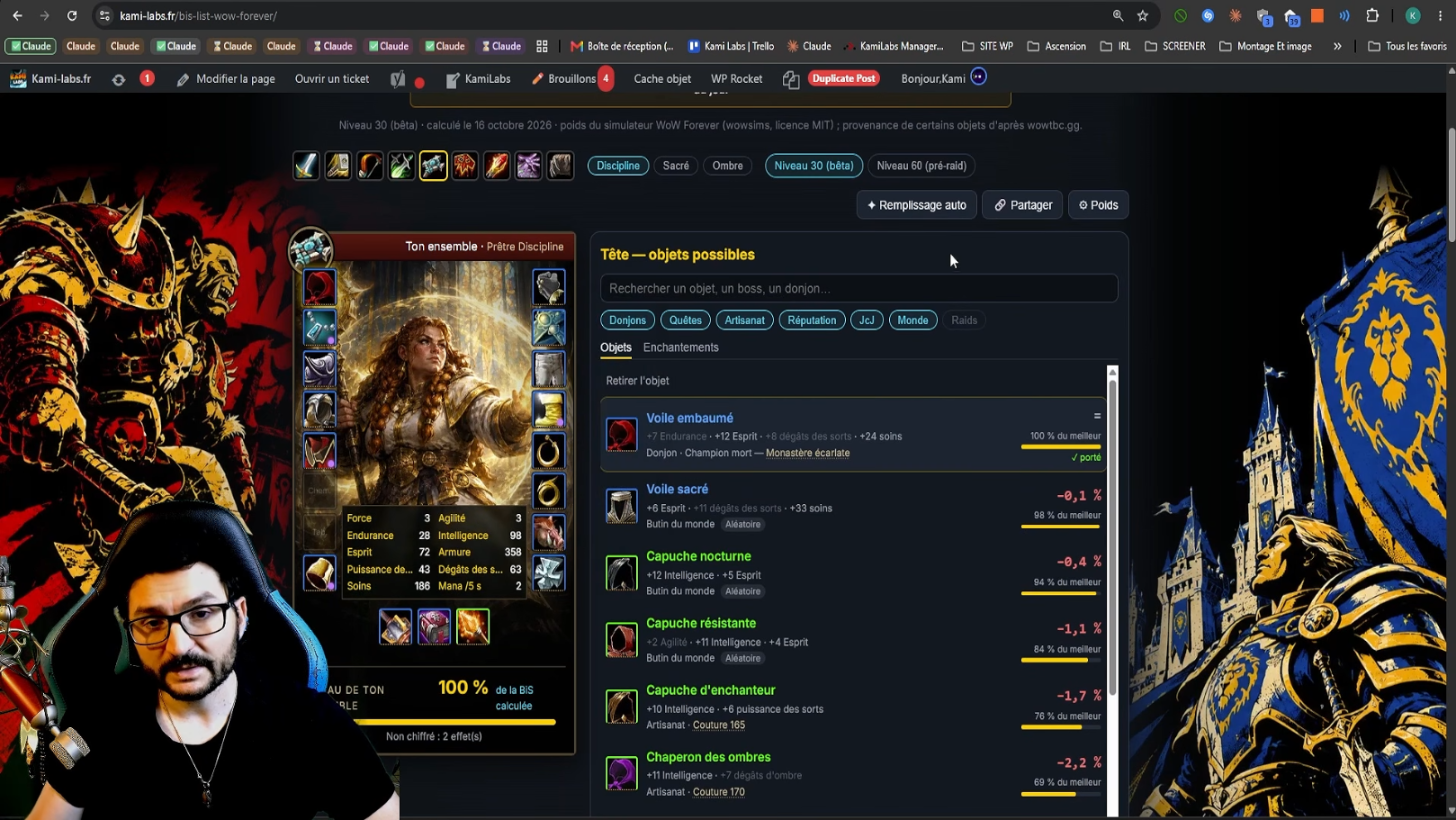
At endgame, you look for pre-BiS. BiS means « best in slot », the best item available for a given slot. Before raids, these items come from dungeons, professions (crafting), the auction house and other sources. Our BiS List gathers the pre-raid gear, then the raid versions, with alternatives and the best items calculated through theorycraft. A click on an item opens the page of the relevant dungeon: where it is, on which boss, how to farm it.
On the PvP side, information is still scarce. We know a season system with ranks to unlock is coming, a bit like the old rank 14 that let you buy gear. So there will be PvP sets to obtain, probably by farming battlegrounds. I will make a video dedicated to PvP, and others on dungeons and raids, after launch.
You will also find on the site the sets page added to the game for each specialization, and the tier list. It relies on the simulations from MythicSim, which are based on theorycraft and on datamined gear (extracted from the game files) as of today. The ranking moves almost every day with patches and discoveries, so it remains indicative. I will update it with logs, meaning performance data from real players in raids, far more objective than simulations. They will only arrive a few months after launch, once the first raids are open.

0 Commentaires
Aucun commentaire pour le moment. Soyez le premier à commenter !