
Ten items for 9 gold and 87 silver: that is the total the Cheap Upgrades addon showed at the bottom of its window, in a game image from November 18, 2026. An addon is a small program that adds a feature to the game interface; this one is published on CurseForge for WoW Forever. It scans the Auction House (the game’s marketplace) and suggests, for each armor slot, the cheapest upgrade for your specialization.
It arrives just as Blizzard is due to lower the deposit, the sum advanced to list an item for sale, from 1 silver to 1 copper. Our article on the deposit traces the announcement and the delays.
1 copper deposit: what Blizzard wrote, and what is missing
The table lists the dates that matter since the change was postponed. The minimum deposit has been 1 silver, or 100 copper, since launch: until it drops, listing an item that sells for less than 100 copper costs more than it earns.
| Date (2026) | What the sources say |
|---|---|
| November 12 | Blizzard removes the Auction House changes from the hotfix list and says they will go live with the November 17 maintenance (Kaivax’s post). |
| November 17 and 18 | Weekly maintenance: November 17 for the Americas, November 18 for Europe according to Bind on Forever. |
| November 18, 4:24 a.m. | Official hotfix list for November 17 (US forum): no line about the Auction House. |
As of November 18, 2026, we found no Blizzard message confirming that the deposit has dropped to 1 copper. Community sites repeat the maintenance date, not an in-game observation. The surest check is still to list a cheap item and read the deposit shown: if it is below 1 silver, the change is live. The rest of this article does not depend on that figure.

A tab in the Auction House: what the addon does
The CurseForge page, updated on November 17, 2026 and credited to the author KanikkekodeUI, lists WoW Forever as a compatible version. It describes a “Cheap Upgrades” tab added to the Auction House window, which works out the best item for the money in each slot and updates as soon as you change specialization, price cap or gear, without a new scan.
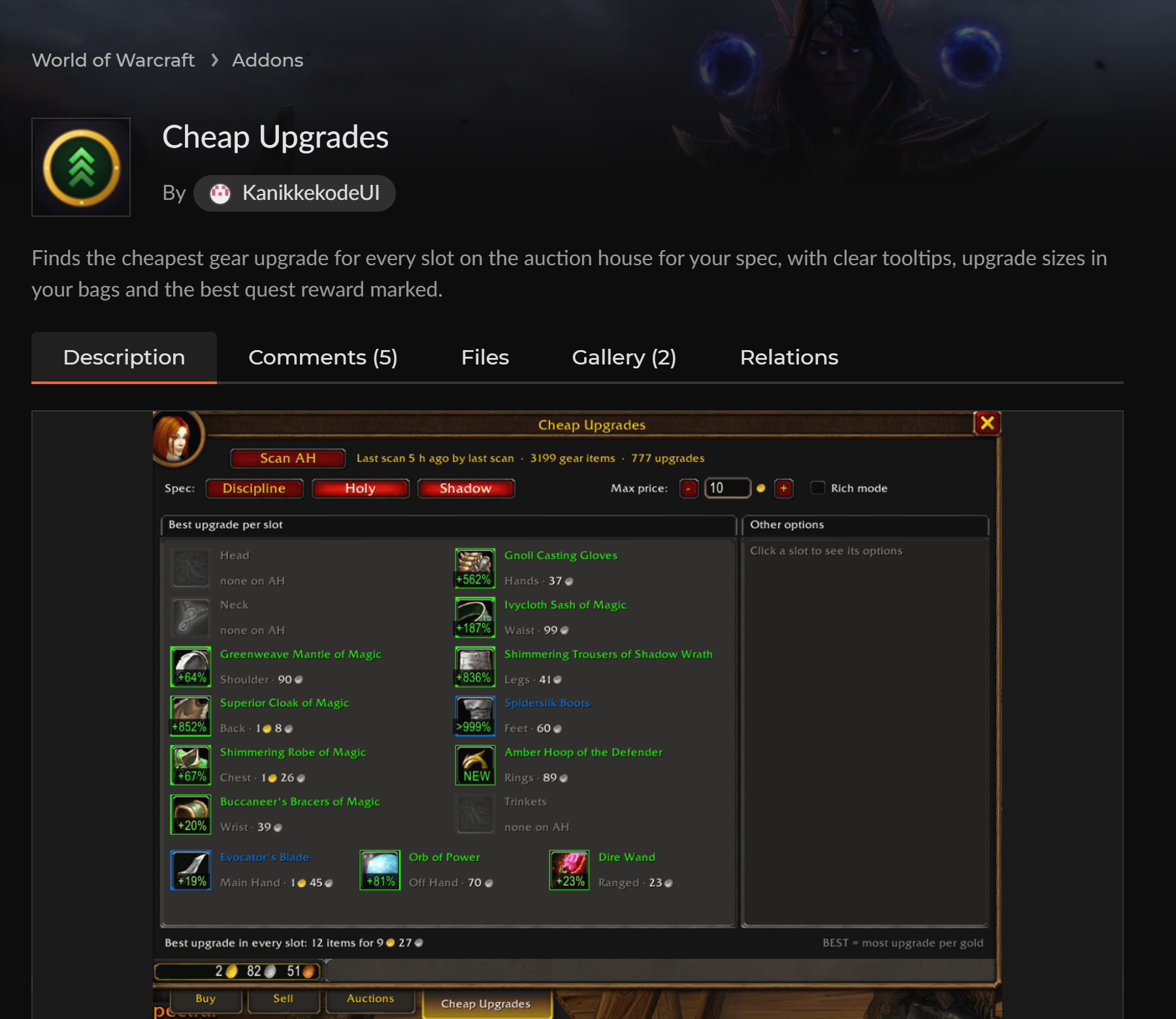
According to the same page, it handles 28 specializations with built-in stat weights, derived from WoW Forever simulations, keeps 14 days of price history, flags upgrades already in your bags and marks the best quest reward. It can run its own scan or read one from another addon, such as Auctionator. It only reads the Auction House: buying stays manual. On addon restrictions, see our article on restricted addons like on Midnight; more tools are gathered in our recommended addons.
Reading the window: one item per slot
In the image, the “Best upgrade per slot” list shows one item per slot, with its price and an upgrade percentage calculated by the addon. The “Scan AH” button starts the scan, and the “Last scan 15 h ago” note is a reminder that prices may have changed since.
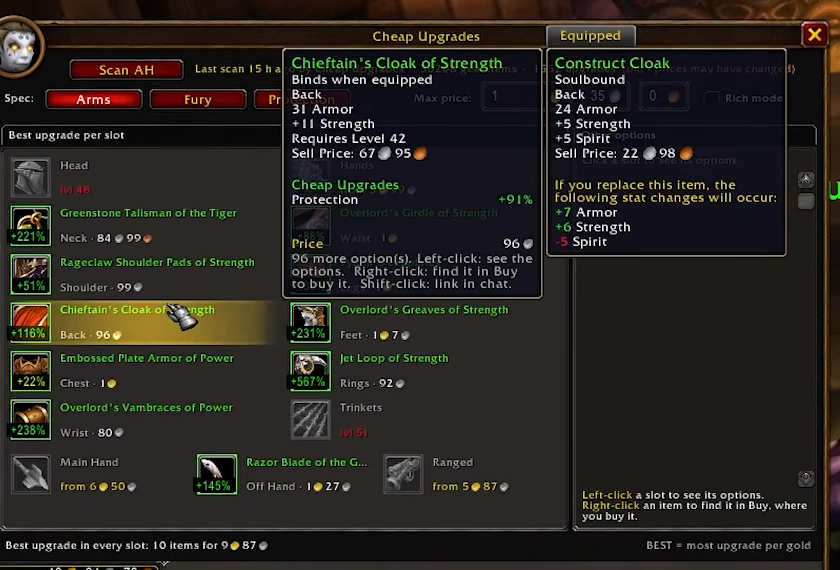
The tooltip compares a cloak, Chieftain’s Cloak of Strength, to the equipped cloak: 31 armor and +11 Strength, level 42 required, against 24 armor, +5 Strength and +5 Spirit. The “of Strength” suffix is one of those names with randomly rolled stats that the Warcraft Wiki item suffix page describes. The prices readable here vary by realm and over time.
Price cap and “Rich mode”
Budget is set by the “Max price” field: in the image, the silver and copper fields show 35 and 0 (the gold field is cut off). The “Rich mode” checkbox ignores it, according to the CurseForge page, to show the biggest upgrade whatever the cost.
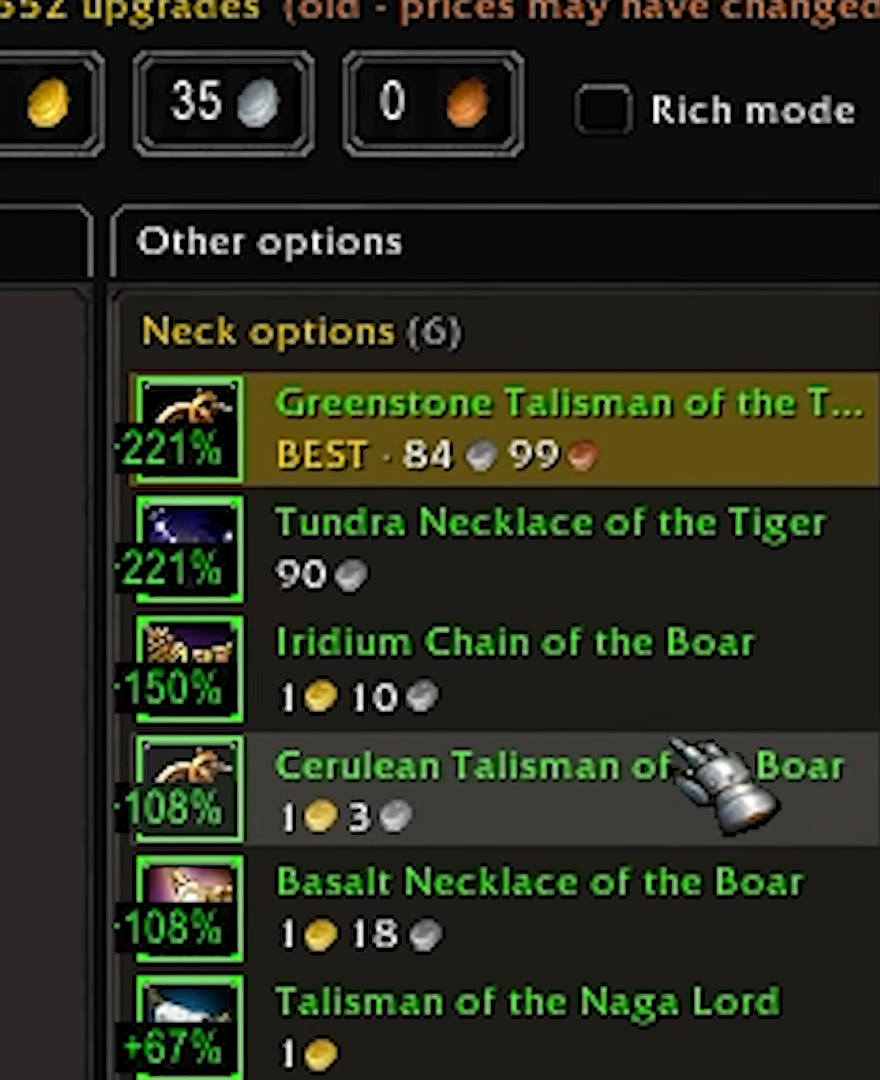
The “Neck options (6)” list ranks the necklaces by percentage: the Greenstone Talisman of the Tiger, marked “BEST”, is listed at 84 silver and 99 copper. At the bottom of the main window, “BEST = most upgrade per gold” spells out the criterion. These percentages compare the item to the one the character wears, based on the addon’s weights: they are not a measure of in-game damage.
Stat weights: the settings and their limits
The Options > AddOns > Cheap Upgrades > “Stat weights” menu says what each stat is worth for the chosen specialization. Three checkboxes: adjust the built-in weights to your talents, count the average value of proc effects and “Use” effects, use Pawn’s weights if that addon is installed. For the Fury specialization, the image shows for example Strength 1, Agility 0.908, Stamina 0.2 and Attack Power 0.5.
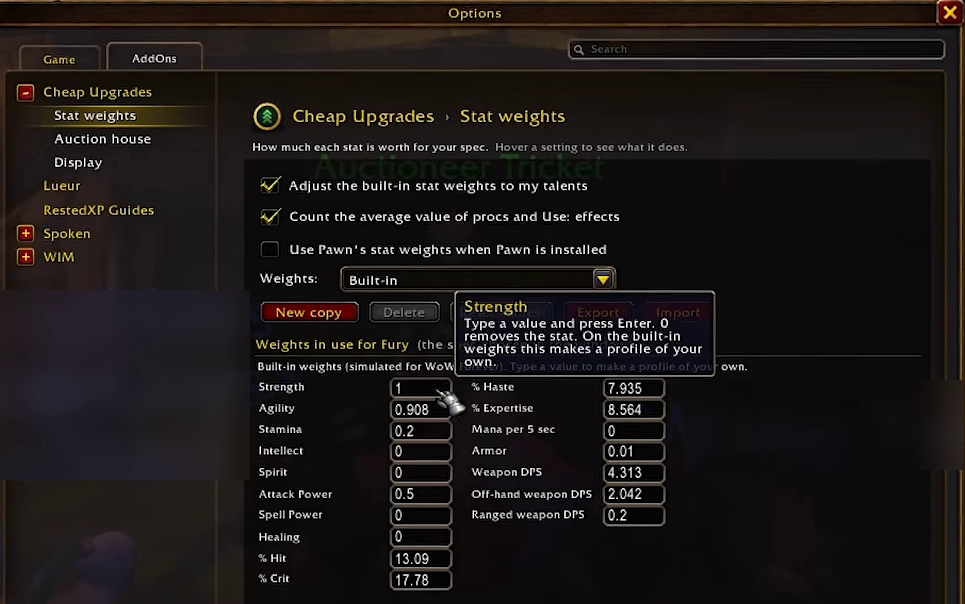
These weights are a model, not the truth: an old scan, a “none on AH” slot or an unusual talent choice changes the result. The addon promises no guaranteed gain, and neither do we.






0 Commentaires
Aucun commentaire pour le moment. Soyez le premier à commenter !