
A file offered to anyone who wants to unlock 100% of a game without playing it. 67 antivirus engines scanned it. None found anything. Yet it empties the Steam accounts of anyone who runs it.
The PC Security Channel received the sample from one of its viewers, who nearly installed it. This Steam malware circulates on the platform’s official forums, disguised as a perfectly ordinary mod. Here’s how it spreads, and more importantly, why nobody can catch it.
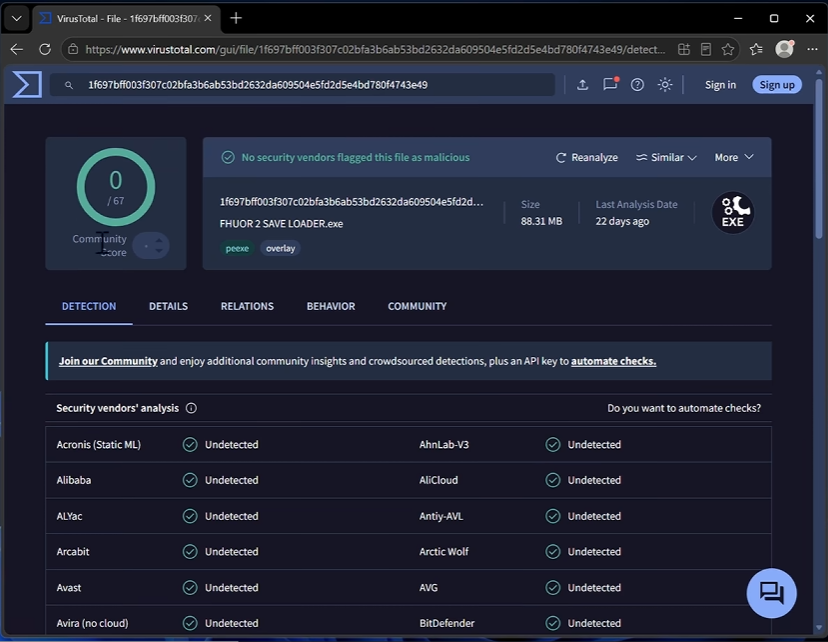
Zero detections across 67 antivirus engines
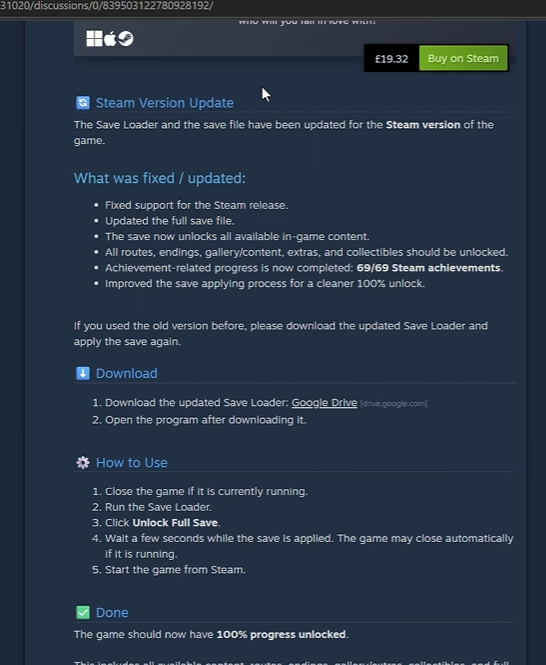
The file is called FHUOR 2 SAVE LOADER.exe and weighs 88.31 MB. Submitted to VirusTotal, the service that runs a single file through dozens of antivirus engines at once, it comes back with 0 detections out of 67 engines. It comes from a message posted on Steam’s official forum, presented as a mod for a recently released game. Its promise fits in one sentence: unlock all the progress and all 69 achievements in one click.
Grabbing a full save file isn’t shocking on its own. On a big single-player game like Skyrim, a player who has already finished the adventure sometimes looks for a ready-made file to reopen every zone without redoing everything. That ordinary need is exactly what the message exploits.
This silence from antivirus engines is exactly the signature of an infostealer, a program built to steal credentials and sensitive data without drawing attention. No wave of alerts, no noisy behavior. Just a few quiet connections, and passwords slipping off to a remote server without a hitch.
The sample is nothing new. The last VirusTotal scan dates back 22 days, and the video’s creator says he received a report well before that. This kind of Steam malware has been circulating on the platform’s forums for a long time.
The forum comments say it all, further down
At the top of the message posted on Steam Community, the first replies are glowing. « Thanks a lot, this really helped. » « Super useful. » Nothing hints at a problem. That’s the trap: a comment thread that starts well proves nothing at all.
You have to scroll down for the tone to change. One comment warns that the application contains malicious code, a credential stealer built to grab the Steam account, the password, and the cookies, those tokens that keep your session open without asking for your login again. The instruction is clear: do not download.
A second account goes further. As soon as the infected file is launched, the attacker takes control of the account. The interface language switches to Russian, and items get sent to a ghost account. The question of what you actually own on a gaming account then comes up in the harshest possible terms: you own nothing anymore, and there’s no one to call.
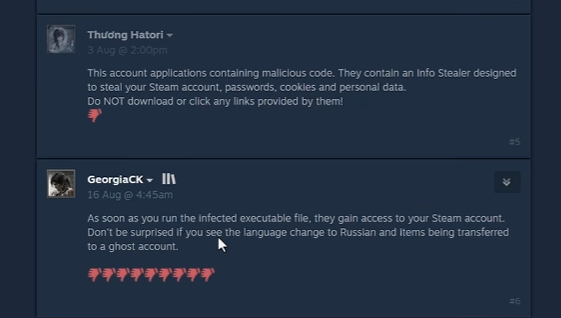
The positive reviews at the top of the page look like bait, or like victims who haven’t yet realized what they just installed. The warnings, on the other hand, come from players who have already been robbed. Nothing in the first three comments would have hinted at it.
The password that blinds automated scans
The way the file is distributed gives a first clue. The link posted on the forum leads to Google Drive, where a password-protected ZIP archive sits. Next to it, a text file named « password.txt » holds that password. The stated reason is simple: « for your security. » The opposite happens.
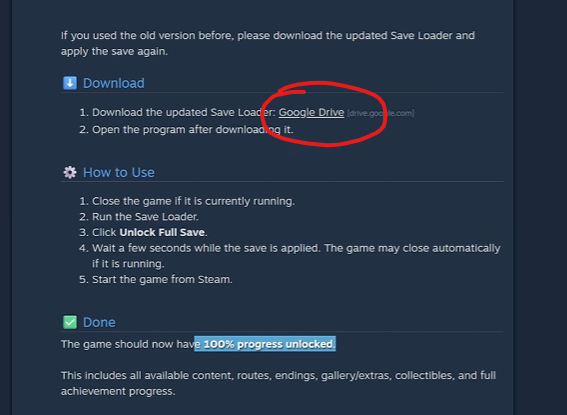
Until the password is entered, the archive’s contents stay encrypted. No sandbox, those disposable, isolated machines where a suspicious file gets run to see what it does without risk, can open it on its own. No automated Google Drive scanning service can read it either. So the file gets inspected by no one, not because it’s invisible, but because it’s locked. That’s what explains the VirusTotal report showing zero detections.
The technique has a precise name: detection evasion, the art of making a file unreadable to automated scans. It’s nothing exotic. The cybercriminals who cash in on their hits use it routinely, because it costs nothing and works almost every time. This isn’t a technically sophisticated Steam malware. It’s a lock placed on the door, keeping machines from looking inside before the victim opens it themselves.
Why this Steam malware slips past detection
Say someone opens the archive themselves and submits the file for analysis. What’s left to see? Almost nothing. The file’s report shows only a handful of outbound connections, rated low risk. That’s all the network detection rules reveal, those signatures that spot suspicious traffic, here requests to a .icu domain flagged as suspicious by Proofpoint Emerging Threats. Two low-level alerts. No solid proof of any data theft.
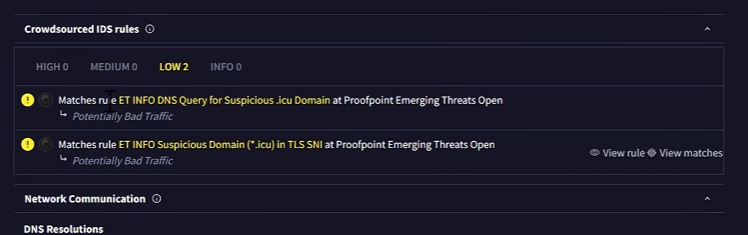
That’s the real problem. How do you prove a program is stealing credentials when everything happens on the server side? From the infected machine, you just see data leaving, nothing more. The report only shows TCP and UDP traffic. If that data is encrypted, made unreadable by a code only the recipient holds, there’s no way to tell whether it’s passwords, session cookies, or a plain technical signal.
Reading files isn’t illegal on its own. Thousands of perfectly legitimate programs access local data without anyone worrying about it. The fact that this program reads Steam files and browser cookies isn’t enough to convict it. It might really do what it promises, with the save unlocker running smoothly while quietly sending data out on the side.
The video says it plainly: proof often arrives too late, once the account has already changed hands or the data resurfaces in a leak elsewhere. The absence of detection proves nothing.
What the file actually does once launched
All that was left was to run it under watch. The file is launched in a test environment, an isolated virtual machine, meaning a simulated computer walled off from the real system. The idea is simple: let it run under observation and note everything it touches, without exposing a real machine.
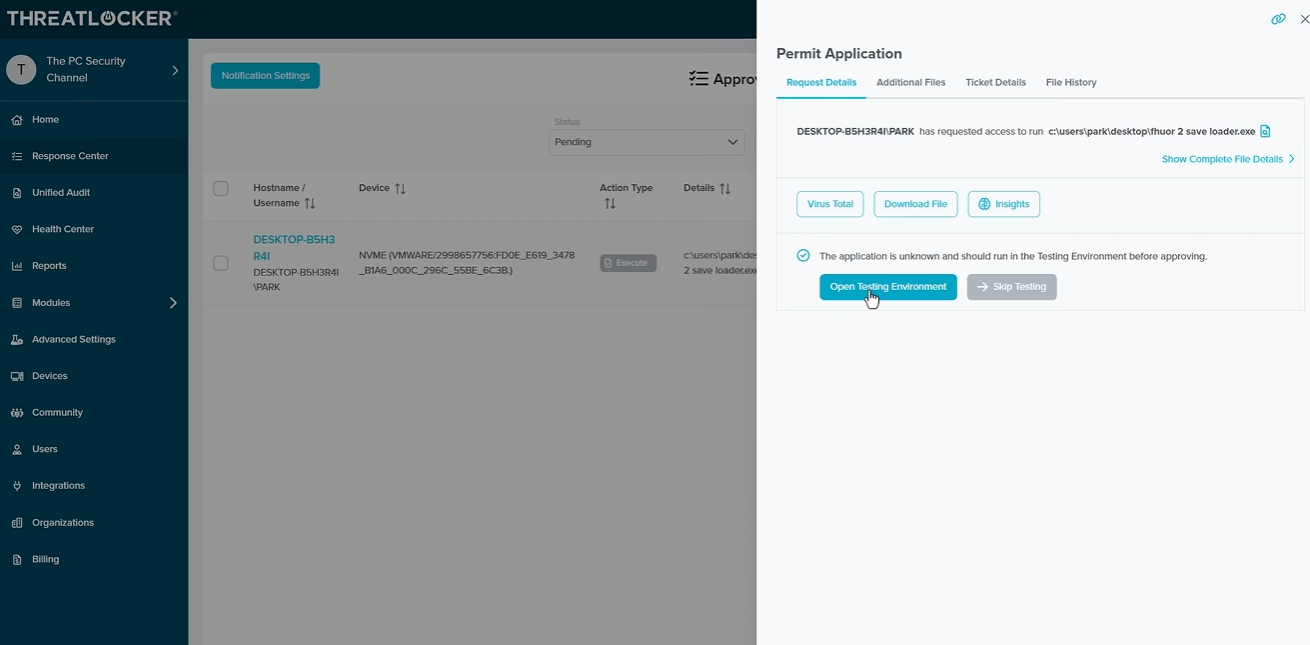
The activity log, the timestamped list of everything the program touches, shows an elevate.exe. Many operations happen in the system’s temporary folder, that disposable workspace where Windows drops files passing through. The application really does launch, as promised. On the network side, two outbound connections show up, attributed to a smartlauncher.exe sitting in that same temporary folder. It’s the most telling detail of the entire observation, and it’s still thin.
One hypothesis stands out: the program might hold back if it senses it isn’t on a real machine. Recognizing its own sandbox is a classic move, and not just among malicious programs, since three labs have shown AI agents capable of breaking out of one. The files opened and created line up with what the VirusTotal report already showed anyway. Worth noting: the video is sponsored by ThreatLocker, whose console is built precisely for this kind of observation.
Even watching it run, nobody holds a smoking gun. Two outbound connections, an endless log, and nothing that looks like a confession.
The rule to remember before you click
The creator of The PC Security Channel’s video sums it up in one line. A download hidden behind an archive password is never harmless. He even puts a number on it: around 99% of these files are malware. If anyone tells you the file is compressed and you need a password to extract it, the answer is no, no exceptions.
The caution doesn’t stop at this one Steam malware. It applies to every post on the Steam Community forums, whatever game is involved or whatever promise is shown. This kind of trap also spreads on its own. Once an account is compromised, the victim’s friends get messages signed with their name, along the lines of « check out this game I just downloaded. » The victim has nothing to do with it. A bot is speaking in their place.
A password needed to open an archive downloaded from a gaming forum has no legitimate reason to exist.






0 Commentaires
Aucun commentaire pour le moment. Soyez le premier à commenter !