
On Ascension, the question « how good am I, actually? » has never had a simple answer. With 21 custom classes and dozens of specialisations that exist nowhere else, the measuring tools built for regular World of Warcraft are useless here: they know none of this server’s spells, roles or combinations. You end up playing on instinct, and believing whatever the chat channel claims.
CoA Analytics is an addon built by a member of the community to fill exactly that gap. It puts each enemy’s role and specialisation above their head in battlegrounds, fleshes out the end-of-match scoreboard, keeps rankings by specialisation and by player, and rates every group member in dungeons while you play. Here is what it does, how it works out its scores, and where to download it.
- 21CoA classes recognised
- 4roles tracked: damage, healing, tanks, support
- 70 KBand no setup required
Four tools in a single addon
Enemy roles, spelled out
A role and specialisation icon appears on every opponent’s nameplate. You can see at a glance who heals and who hits.
A scoreboard worth reading
The end-of-match summary shows everyone’s specialisation, role and level, and flags the top damage dealer and the top healer.
Rankings that build up
Battlegrounds and PvE, by specialisation or by player. History carries over from one session to the next.
Your dungeon, rated live
During the run, each group member gets a score out of 10 tailored to their role, updated fight after fight.
CoA Analytics ships with a French interface, and its slash commands are French words too: /coaa classement opens the rankings, /coaa joueurs the player board. The tables themselves are mostly numbers, icons and class names, so they read fine either way, but the labels and hover explanations are French. The command list further down gives you the English meaning of each one.
Knowing who you are facing, without guessing
This is the most immediately useful feature in a battleground, and the one you stop being able to live without. Above every enemy, the addon places two small icons: their role and their specialisation.
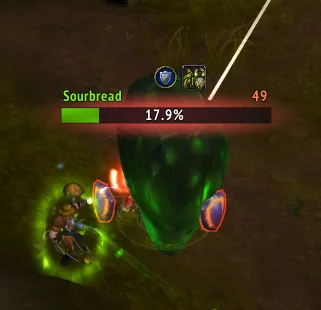
In practice it changes how you pick targets. An enemy healer no longer goes unnoticed until their team becomes unkillable, and a melee fighter is told apart from a ranged one, which saves you from throwing an interception at someone who was never the threat. The addon works with the game’s own nameplates as well as with ElvUI, one of the most widely used interface overhauls.
In capture-the-flag battlegrounds, the addon also places a discreet countdown under the objectives, refreshed every second. It recognises the CoA variants and stays hidden when the time limit cannot be trusted, rather than showing a wrong number.
A scoreboard that finally says something
The game’s end-of-match summary offers nothing but raw columns: killing blows, deaths, damage, healing. It never tells you who was playing what. CoA Analytics adds the class in colour, the specialisation, the role and the level, then marks the match’s best damage dealer and best healer with an icon.
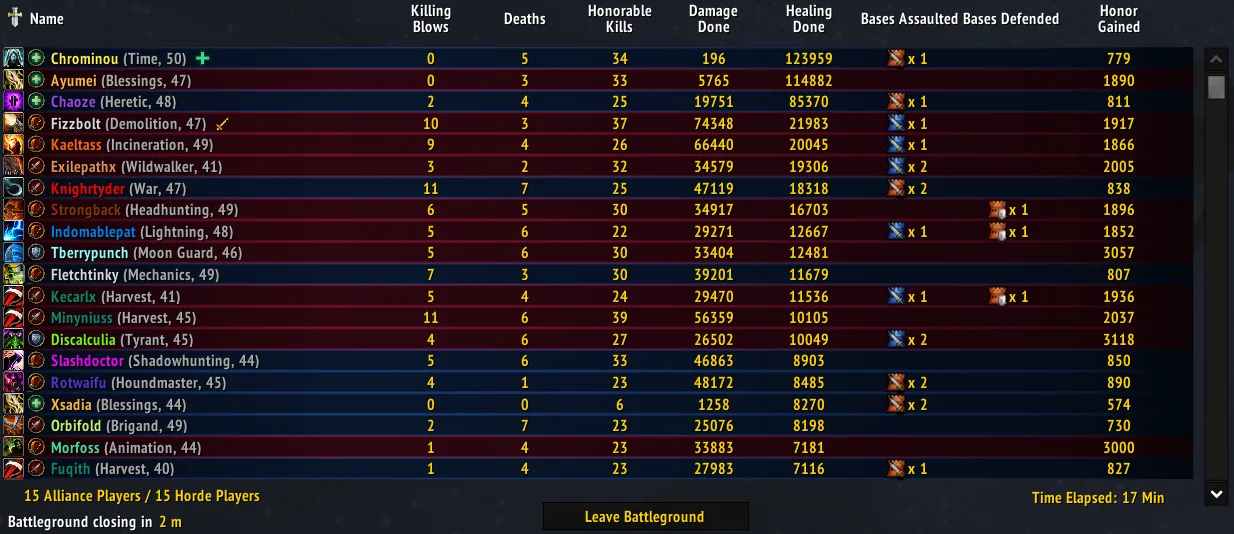
That difference matters more than it looks. On a server where one class can be played as a healer or as pure damage, comparing two players without knowing their specialisation means nothing at all. This scoreboard is also what feeds the rankings described below.
The battleground rankings
The addon accumulates the matches you play and draws two different readings from them, in two tabs.
By specialisation: reading the server meta
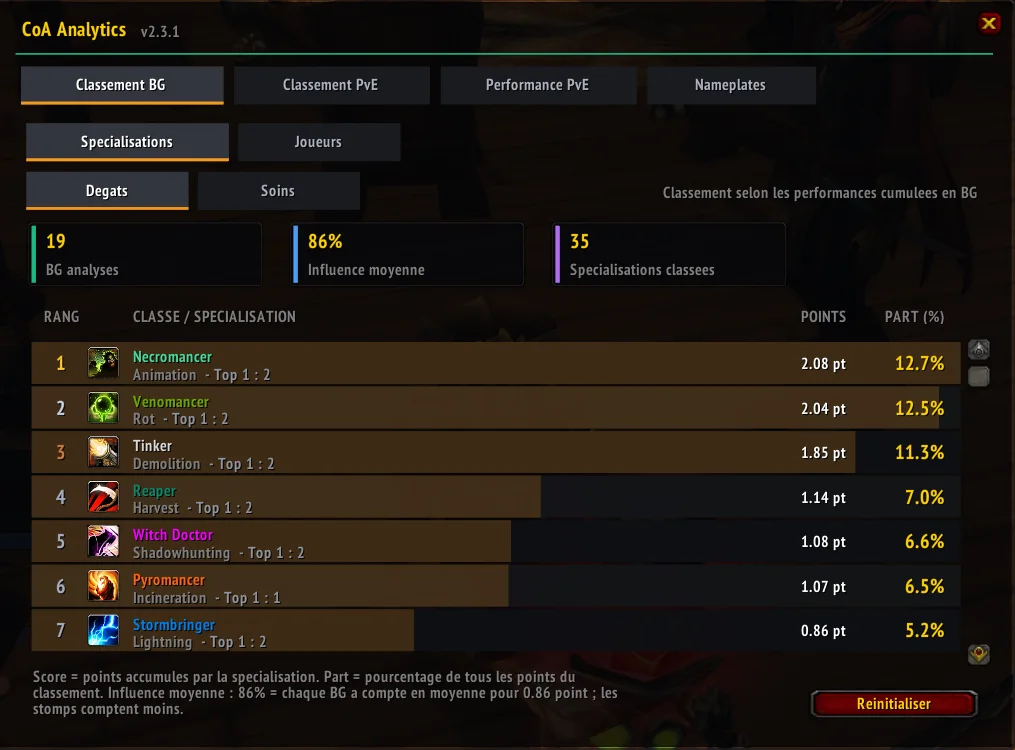
The first view is anonymous and looks at specialisations rather than people. It answers a question everyone on CoA asks sooner or later: out of these dozens of combinations, which ones actually carry weight in a battleground?
By player: an honest look at where you stand
The second view ranks players individually, separately for damage, healing, tanks and support. The important part fits in one sentence: each player is only ever compared to players of the same role in the same match. A healer is never put up against a damage dealer, and a match where nobody produced much penalises no one.
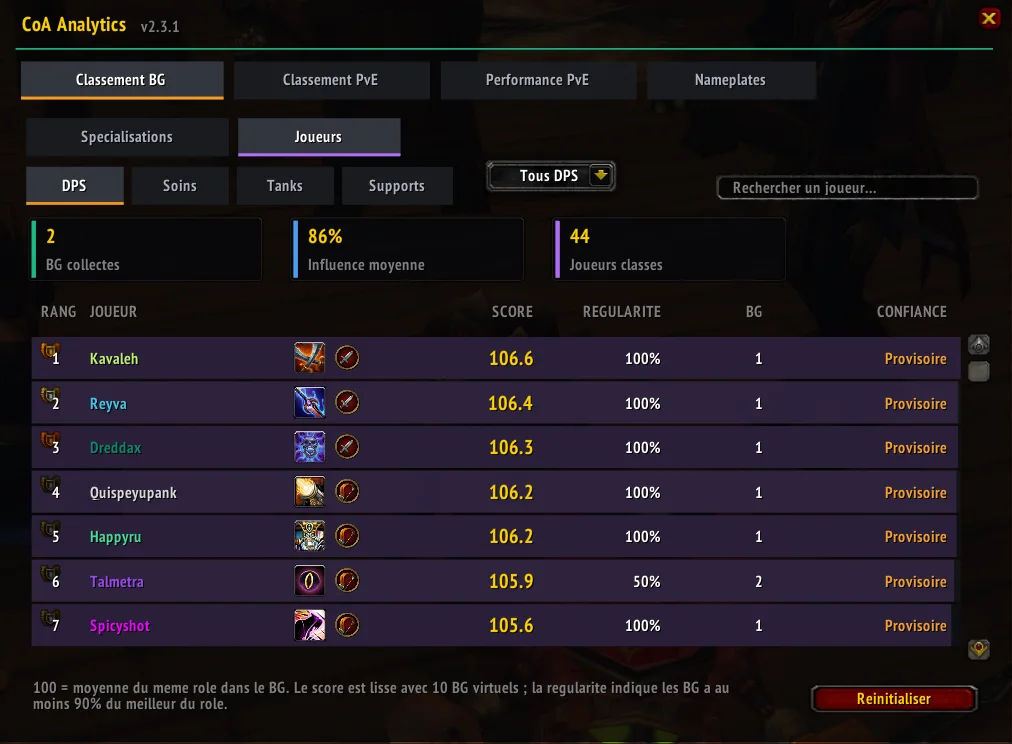
For tanks and support players, the addon goes after what the usual columns ignore: interrupted casts, dispels and successful spell steals. These are the actions that win matches without ever showing up in a damage column. Only the totals are kept, never the individual events.
PvE rankings: damage, healing and tanks
The same principle applies to dungeons and raids, with three categories and three views to choose from: everything, dungeons only, raids only. The distinction matters, because a dungeon and a raid fight do not measure the same thing. A completed dungeon forms one full sample; in a raid, every boss killed counts on its own.
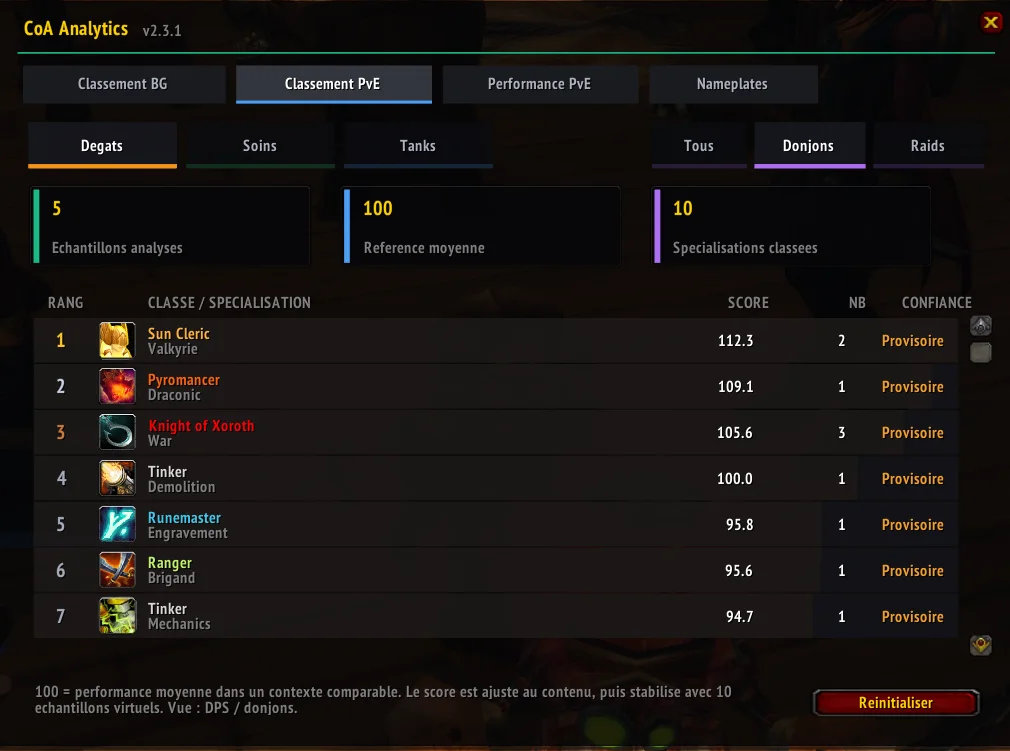
In dungeons, the damage score weighs bosses at 60 % and the rest of the trash at 40 %, which rewards the player hitting where it is hard rather than the one clearing corridors. Healing accounts for healing that was actually needed, absorption shields, incoming pressure, survival and waste. For tanks, the addon looks at threat control, how many enemies are held, stability, resilience, outside help received and damage spikes taken.
The dungeon rated while you run it
This is the newest feature, and the most telling. A dedicated tab follows the dungeon in progress and gives each group member a score out of 10 tailored to their role, updated fight after fight. The benchmark is simple: 7 out of 10 is what the role is expected to deliver in this group. Above that, the player is pulling the group up; below it, something is off.
The last dungeon stays available after you leave the instance, and the data is only replaced when the next one starts. So you can look at what happened once things have calmed down, rather than mid-fight.
Those scores no longer require opening a window. A small movable frame can stay on screen during the dungeon with each player’s name and score, and it disappears on its own once you leave the instance. A button sends the summary to the group channel, so there is no need to retype the figures.
How to read the scores, and what they leave out
This is the part worth the most attention, because it is what separates a serious measuring tool from a counter that simply flatters you. CoA Analytics takes several precautions, and you need to know them to read what it shows correctly.
| The principle | What it prevents |
|---|---|
| A score of 100 is an average, not a ceiling. It stands for the average performance of your role in a comparable context. | Comparing raw figures between a tank and a ranged damage dealer, which means nothing. |
| Virtual samples sitting at the average are added to the real ones: five matches for the battleground rankings, ten for the individual and PvE ones. | A player with a single good game sitting at the top of the ranking forever. |
| A team coefficient reduces the weight of one-sided matches. | A crushing win against an absent team inflating everyone’s scores. |
| A confidence label comes with every line: Provisoire below 5 samples, Moyenne from 5 to 19, Fiable from 20 up. | Taking seriously a ranking that still rests on three games. |
On support players, the author says so himself in the documentation: only measurable damage and healing feed the score. Anything the game client does not expose, such as crowd control or positioning, escapes the calculation, and the score flags this as a known limit. A support player with an average score is therefore not necessarily a bad one, and it says something good about a measuring tool that it bothers to point this out.
A word on privacy and on performance, since the question always comes up with this kind of addon. The data stays on your machine: only aggregated statistics are kept, never the detail of combat events. Threat, the most expensive thing to measure, is sampled about three times per second and only during fights.
Installing CoA Analytics
Installation follows the usual addon routine, and it starts by closing the game. The archive holds two folders, and both need copying.
- Close World of Warcraft completely. Reloading the interface is not enough: the game only reads its addon list at startup.
- Copy both folders into
Interface\AddOns\. Download the archive at the bottom of this page, extract it, then placeCoAAnalyticsandCoABGIntelligencedirectly into your client’sInterface\AddOns\folder, agreeing to replace the older ones. - Start the game and check. On the character selection screen, open the addon list and make sure CoA Analytics is ticked. Once in game, type
/coaa settingsto open the interface, or use the icon added next to the minimap.
The second folder, CoABGIntelligence, carries the addon’s former name. It is not a duplicate: it is a migration bridge that loads once to recover your settings and your old rankings. It recalculates nothing and deletes nothing. If you are discovering the addon today it will simply find nothing to import, and that is perfectly fine.
Also check that both folders sit directly inside Interface\AddOns\, not in a sub-folder. If extracting created a parent folder containing them, move them up one level.
The commands worth knowing
Everything is reachable from the interface and from the minimap icon, but the commands are quicker. They are French words, so here is what each one opens.
/coaa settings | opens the main interface |
/coaa classement | the battleground ranking by specialisation |
/coaa joueurs | the battleground ranking by player |
/coaa pve | the dungeon and raid rankings |
/coaa performance | the current dungeon, or the previous one |
/coaa pve status | tells you whether PvE collection is running |
/coaa pve complete | validates the dungeon by hand, if the game never signalled the end |
/coaa status | the state of nameplate detection |
/coaa retry | restarts specialisation detection |
/coaa pve log on | records a detailed dungeon diagnostic, which /coaa pve log status then lets you review |
/coaa log | opens the detection log, /coaa log clear empties it |
The older /coabgi command still works for anyone who has it in muscle memory.
Download CoA Analytics
The addon is free. We host it here with its author’s permission, so that Ascension players have a stable link. The checksum shown under the button lets you confirm that the file you downloaded is byte for byte the one we put online.
CoA Analytics
Battleground, dungeon and raid analysis for CoA. Published on 8 August 2026.
Download CoA Analytics 2.13.0 (~99 KB)CoAAnalytics-v2.13.0.zip101,101 bytes (~99 KB)82e29e5d4914d83af3352623864401094cf1f159920404f234204f088e349890Once you know what you are worth, the next question is what to play and with what. Our PvE and PvP tier lists rank the CoA specialisations, and on our side we maintain LootCollector, KamiLabs Edition, an addon that pools the locations of Worldforged items between players. The two work side by side without getting in each other’s way.
Unofficial community addon, not affiliated with Blizzard Entertainment or Project Ascension. Its author, a member of the server’s community, chose to remain anonymous; the code was written with the assistance of an artificial intelligence, as stated in its identification file. Version 2.13.0 recorded on 8 August 2026.







0 Commentaires
Aucun commentaire pour le moment. Soyez le premier à commenter !